Homework #4 – Getting Started Guide

1 Unsupervised Clustering Algorithms

1.1 K-Means Clustering

1.1.1 Cluster Assignment Visualization

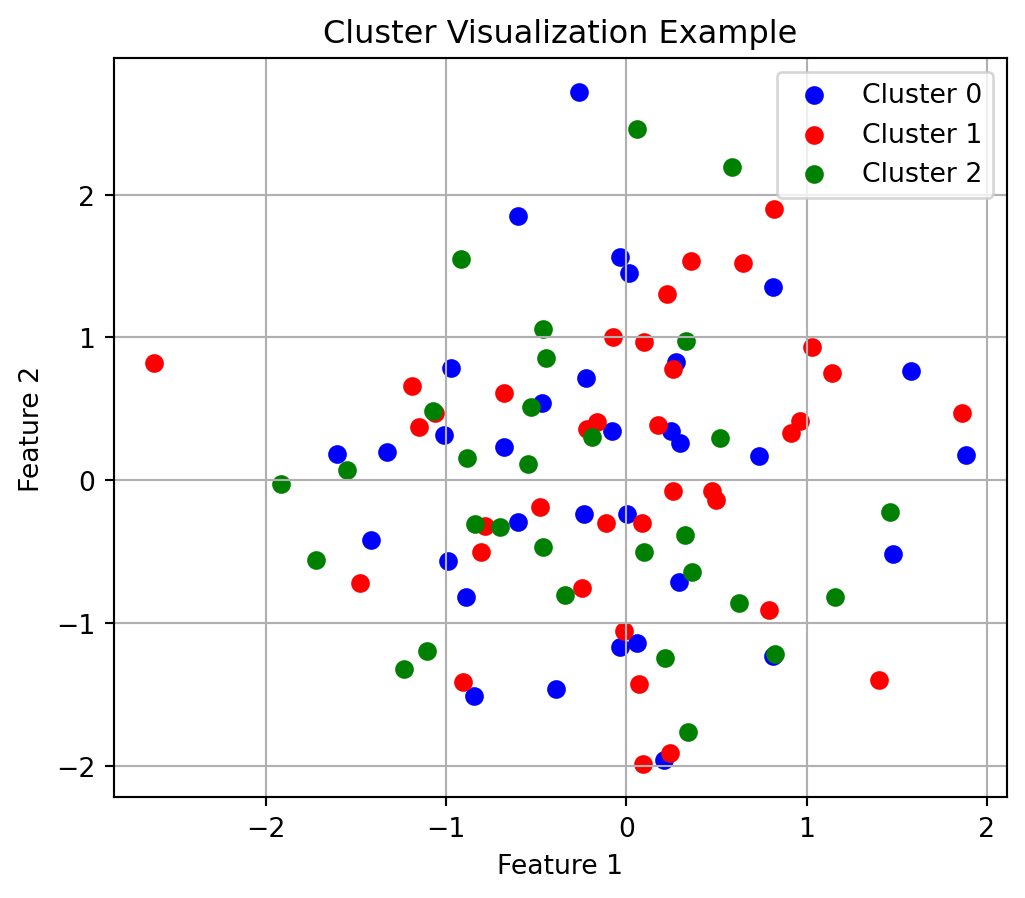
When visualizing clustering results, using distinct colors helps identify group boundaries:

Code
# Example of visualizing clusters with appropriate colors
np.random.seed(42)
x = np.random.randn(100, 2)  # Random 2D points
labels = np.random.randint(0, 3, 100)  # Random cluster assignments

plt.figure(figsize=(6, 5))
colors = ['blue', 'red', 'green']
for i, color in enumerate(colors):
    plt.scatter(x[labels == i, 0], x[labels == i, 1], color=color, label=f'Cluster {i}')
plt.legend()
plt.grid(True)
plt.title("Cluster Visualization Example")
plt.xlabel("Feature 1")
plt.ylabel("Feature 2")
plt.show()

Visualization of cluster assignments with color coding

1.1.2 Confusion Matrix Interpretation

Confusion matrices help evaluate clustering quality but require careful interpretation since cluster indices may not match true class labels:

Code
# Example of creating and interpreting a confusion matrix
true_labels = np.array(['A', 'A', 'B', 'B', 'C', 'C', 'A', 'B', 'C'])
pred_labels = np.array([0, 0, 1, 1, 2, 2, 0, 2, 1])  # Arbitrary cluster indices

# Count occurrences
confusion = pd.DataFrame(
    {0: [3, 0, 0], 1: [0, 2, 1], 2: [0, 1, 2]},
    index=['A', 'B', 'C']
)
print("Confusion Matrix (rows: true labels, columns: predicted clusters):")
print(confusion)
Confusion Matrix (rows: true labels, columns: predicted clusters):
   0  1  2
A  3  0  0
B  0  2  1
C  0  1  2

1.2 Gaussian Mixture Models and EM

1.2.1 Understanding the Multivariate Gaussian

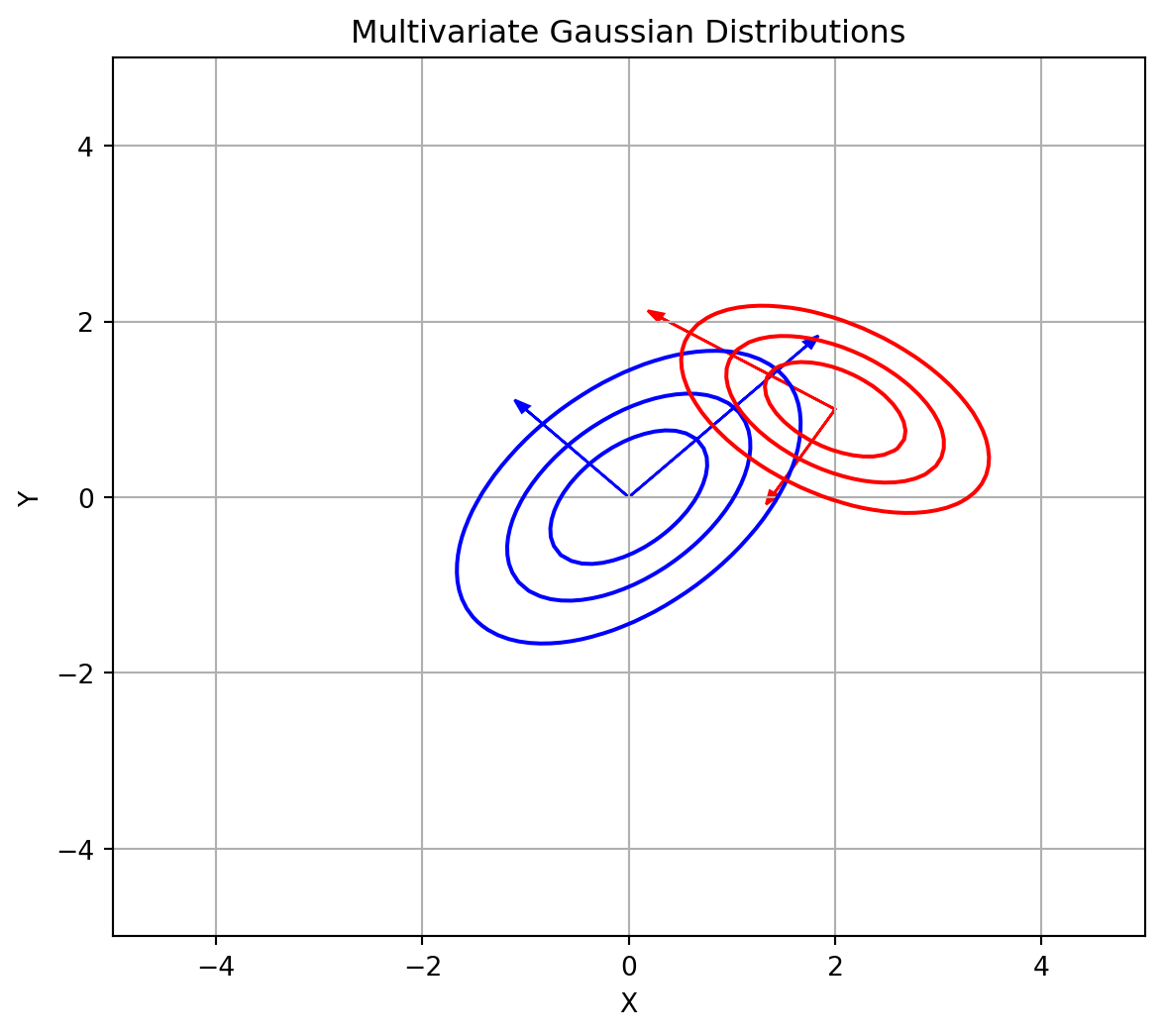
The multivariate Gaussian probability density function forms the foundation of GMM:

Code
# Visualize 2D Gaussian distributions
def plot_gaussian(mean, cov, color='blue', ax=None):
    if ax is None:
        fig, ax = plt.subplots(figsize=(6, 6))
    
    # Generate grid of points
    x, y = np.meshgrid(np.linspace(-5, 5, 100), np.linspace(-5, 5, 100))
    pos = np.dstack((x, y))
    
    # Calculate multivariate normal PDF
    det = np.linalg.det(cov)
    norm_const = 1.0 / (2.0 * np.pi * np.sqrt(det))
    inv_cov = np.linalg.inv(cov)
    
    result = np.zeros_like(x)
    for i in range(x.shape[0]):
        for j in range(x.shape[1]):
            x_centered = pos[i, j, :] - mean
            result[i, j] = norm_const * np.exp(-0.5 * x_centered.T @ inv_cov @ x_centered)
    
    # Plot contours
    levels = np.linspace(0, result.max(), 5)
    ax.contour(x, y, result, levels=levels, colors=color)
    
    # Plot eigenvalue directions
    eigenvalues, eigenvectors = np.linalg.eigh(cov)
    for i in range(len(eigenvalues)):
        length = np.sqrt(eigenvalues[i]) * 2
        ax.arrow(mean[0], mean[1], 
                eigenvectors[0, i] * length, eigenvectors[1, i] * length,
                head_width=0.1, color=color)
    
    return ax

# Example usage
mean1 = np.array([0, 0])
cov1 = np.array([[1, 0.5], [0.5, 1]])

mean2 = np.array([2, 1])
cov2 = np.array([[0.8, -0.3], [-0.3, 0.5]])

fig, ax = plt.subplots(figsize=(7, 6))
plot_gaussian(mean1, cov1, 'blue', ax)
plot_gaussian(mean2, cov2, 'red', ax)
ax.grid(True)
ax.set_xlim(-5, 5)
ax.set_ylim(-5, 5)
ax.set_xlabel("X")
ax.set_ylabel("Y")
ax.set_title("Multivariate Gaussian Distributions")
plt.show()

Contour plots of two 2D Gaussian distributions with principal directions

1.2.2 Mixture Models: “Patching the Bumps”

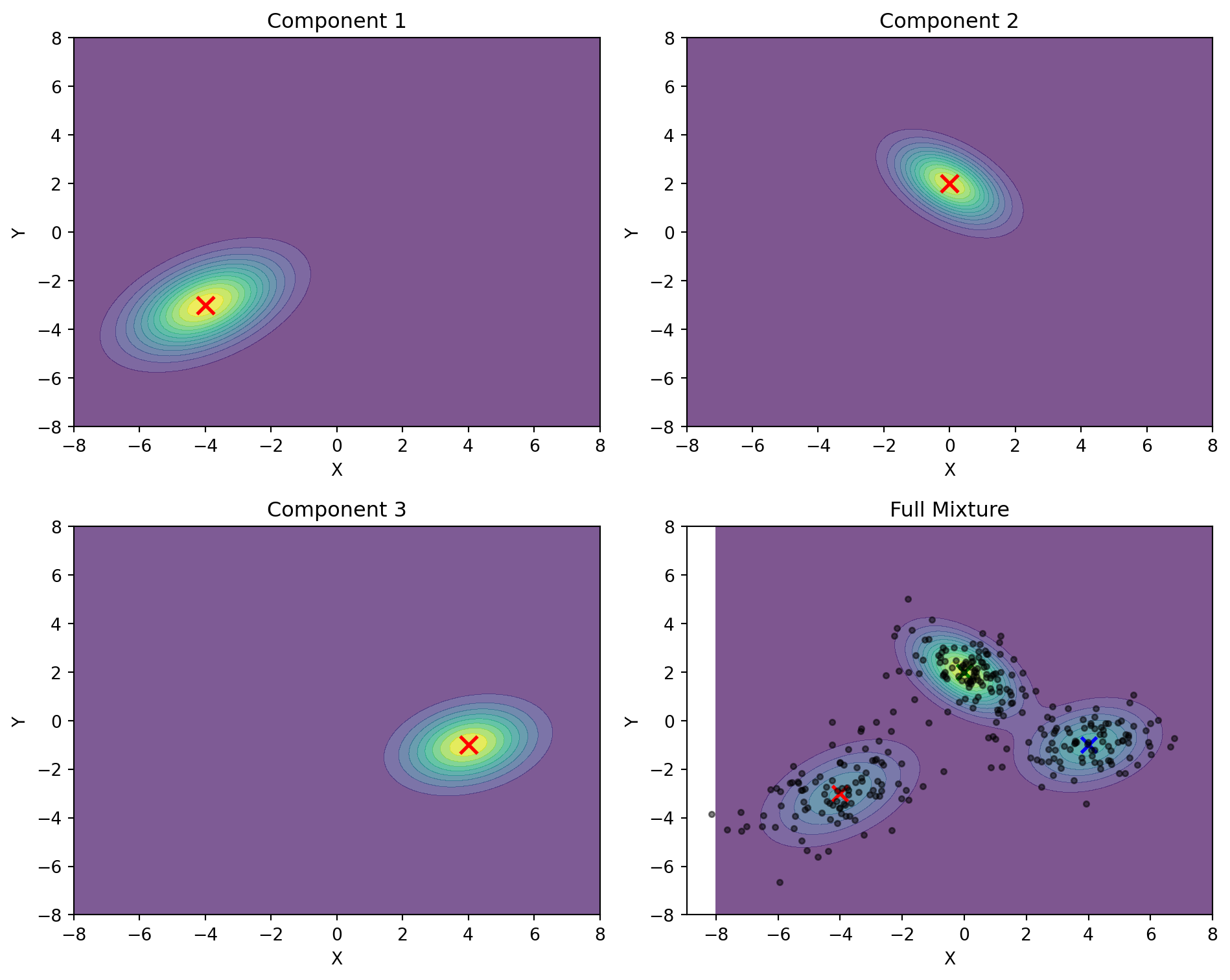
Gaussian Mixture Models combine multiple Gaussian components to represent complex data distributions:

Code
# Demonstrate a 3-component GMM in 2D
def plot_gmm_components():
    # Create grid
    x = np.linspace(-8, 8, 100)
    y = np.linspace(-8, 8, 100)
    X, Y = np.meshgrid(x, y)
    pos = np.empty(X.shape + (2,))
    pos[:, :, 0] = X
    pos[:, :, 1] = Y
    
    # Define 3 Gaussian components
    means = [
        np.array([-4, -3]),
        np.array([0, 2]),
        np.array([4, -1])
    ]
    
    covs = [
        np.array([[2, 0.8], [0.8, 1.5]]),
        np.array([[1, -0.5], [-0.5, 1]]),
        np.array([[1.5, 0.3], [0.3, 1]])
    ]
    
    weights = [0.3, 0.4, 0.3]  # Mixing weights
    
    # Create individual Gaussians
    rv1 = multivariate_normal(means[0], covs[0])
    rv2 = multivariate_normal(means[1], covs[1])
    rv3 = multivariate_normal(means[2], covs[2])
    
    # Create figure with subplots
    fig, axs = plt.subplots(2, 2, figsize=(10, 8))
    
    # Plot individual components
    component_pdfs = []
    titles = ["Component 1", "Component 2", "Component 3", "Full Mixture"]
    components = [
        rv1.pdf(pos), 
        rv2.pdf(pos), 
        rv3.pdf(pos),
        weights[0] * rv1.pdf(pos) + weights[1] * rv2.pdf(pos) + weights[2] * rv3.pdf(pos)
    ]
    
    # Random sample data from the mixture
    np.random.seed(42)
    n_samples = 300
    mixture_samples = []
    
    # Draw samples from the mixture
    for _ in range(n_samples):
        # Choose component based on weights
        component = np.random.choice(3, p=weights)
        # Draw from selected component
        if component == 0:
            sample = np.random.multivariate_normal(means[0], covs[0])
        elif component == 1:
            sample = np.random.multivariate_normal(means[1], covs[1])
        else:
            sample = np.random.multivariate_normal(means[2], covs[2])
        mixture_samples.append(sample)
    
    mixture_samples = np.array(mixture_samples)
    
    # Plot each component and the mixture
    for i, (ax, pdf, title) in enumerate(zip(axs.flat, components, titles)):
        contour = ax.contourf(X, Y, pdf, cmap='viridis', alpha=0.7, levels=12)
        ax.set_title(title)
        ax.set_xlabel('X')
        ax.set_ylabel('Y')
        
        # Add component means
        if i < 3:
            ax.scatter(means[i][0], means[i][1], 
                     color='red', s=100, marker='x', linewidth=2)
        else:
            # In the full mixture plot, show all means and the data points
            for j, mean in enumerate(means):
                ax.scatter(mean[0], mean[1], 
                        color=['r', 'g', 'b'][j], s=80, marker='x', linewidth=2)
            
            # Add the mixture data points
            ax.scatter(mixture_samples[:, 0], mixture_samples[:, 1], 
                     color='black', s=10, alpha=0.5)
    
    plt.tight_layout()
    plt.show()

plot_gmm_components()
Visualization of a three-component Gaussian Mixture Model

1.2.3 1D Model Fitting Examples

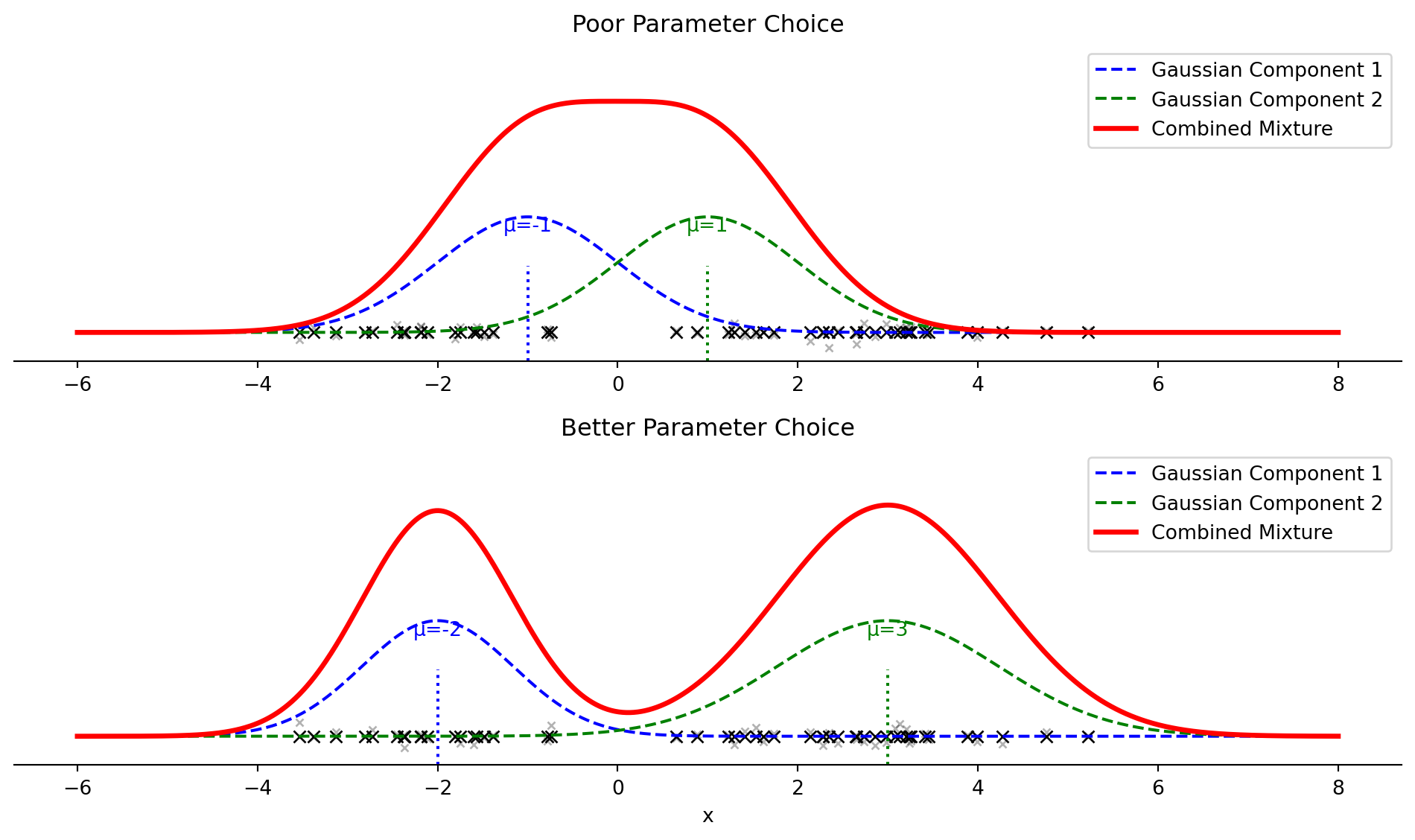
Visualizing how GMM fits data on a number line helps understand parameter selection:

Code
# 1D GMM example with number line visualization
def plot_1d_gmm_numberline():
    # Generate data from mixture of 1D Gaussians
    np.random.seed(42)
    n_samples = 50  # Fewer samples for clarity
    
    # True distribution: mixture of two Gaussians
    x1 = np.random.normal(-2, 0.8, int(0.4 * n_samples))
    x2 = np.random.normal(3, 1.2, int(0.6 * n_samples))
    x = np.concatenate([x1, x2])
    
    # Plotting range
    x_range = np.linspace(-6, 8, 1000)
    
    fig, (ax1, ax2) = plt.subplots(2, 1, figsize=(10, 6))
    
    # Poor parameter choices
    means_poor = [-1, 1]
    variances_poor = [1, 1]
    weights_poor = [0.5, 0.5]
    
    # Better parameter choices
    means_good = [-2, 3]
    variances_good = [0.7, 1.5]
    weights_good = [0.4, 0.6]
    
    # Function to plot each case
    def plot_gmm_case(ax, means, variances, weights, title):
        # Plot the data points on number line
        ax.plot(x, np.zeros_like(x), 'kx', markersize=6)
        
        # Small jitter for visibility
        ax.plot(x, np.random.normal(0, 0.02, size=len(x)), 'kx', alpha=0.3, markersize=4)
        
        # Plot distributions
        pdf_total = np.zeros_like(x_range)
        
        for i in range(2):
            # Component curve
            component = weights[i] * 1/np.sqrt(2*np.pi*variances[i]) * \
                      np.exp(-(x_range - means[i])**2 / (2*variances[i]))
            pdf_total += component
            
            # Scale components for visibility
            scaled_component = 0.4 * component / np.max(component)
            ax.plot(x_range, scaled_component, '--', linewidth=1.5, 
                   color=['blue', 'green'][i], 
                   label=f'Gaussian Component {i+1}')
            
            # Mark the mean
            ax.axvline(x=means[i], ymax=0.3, linestyle=':', 
                      color=['blue', 'green'][i])
            ax.text(means[i], 0.35, f'μ={means[i]}', 
                   color=['blue', 'green'][i], 
                   horizontalalignment='center')
        
        # Plot the full mixture (scaled)
        scaled_total = 0.8 * pdf_total / np.max(pdf_total)
        ax.plot(x_range, scaled_total, 'r-', linewidth=2.5, label='Combined Mixture')
        
        # Set title and labels
        ax.set_title(title)
        ax.set_yticks([])
        ax.spines['left'].set_visible(False)
        ax.spines['right'].set_visible(False)
        ax.spines['top'].set_visible(False)
        ax.set_ylim(-0.1, 1)
        ax.legend(loc='upper right')
    
    # Plot each case
    plot_gmm_case(ax1, means_poor, variances_poor, weights_poor, 
                 'Poor Parameter Choice')
    plot_gmm_case(ax2, means_good, variances_good, weights_good, 
                 'Better Parameter Choice')
    
    # X-axis label only on bottom plot
    ax2.set_xlabel('x')
    
    plt.tight_layout()
    plt.show()

plot_1d_gmm_numberline()

Comparing poor and good GMM parameter choices for 1D data

1.2.4 Convergence Monitoring

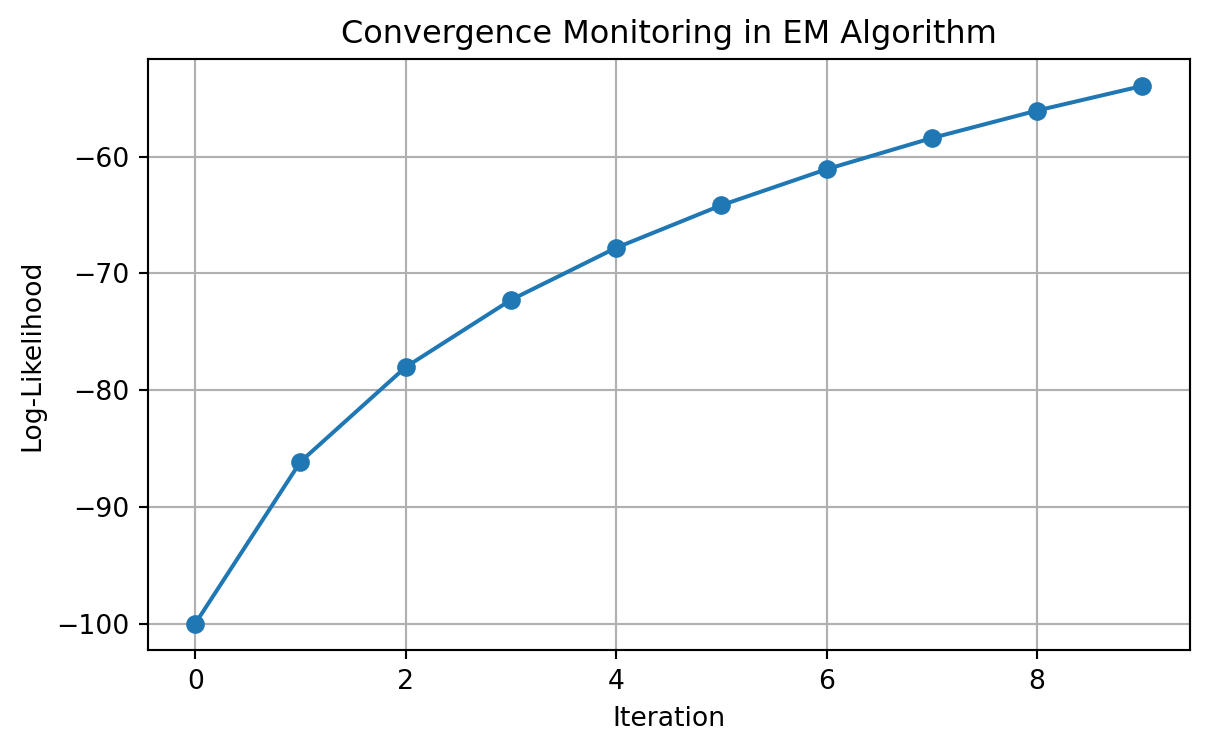
The EM algorithm’s convergence can be monitored through log-likelihood:

Code
# Simple log-likelihood plot example
iterations = np.arange(10)
log_likelihood = -100 + 20 * np.log(iterations + 1)  # Simulated values
plt.figure(figsize=(7, 4))
plt.plot(iterations, log_likelihood, 'o-')
plt.xlabel('Iteration')
plt.ylabel('Log-Likelihood')
plt.grid(True)
plt.title('Convergence Monitoring in EM Algorithm')
plt.show()

Example of log-likelihood convergence in EM algorithm

1.2.5 One-Hot Initialization from K-Means

K-Means results provide an effective initialization for GMM:

Code
# Simplified example of converting K-Means labels to one-hot probabilities
kmeans_labels = np.array([0, 0, 1, 1, 2, 2, 0, 1, 2])
n_samples = len(kmeans_labels)
n_clusters = 3

# Initialize with one-hot encoding
gamma = np.zeros((n_samples, n_clusters))
for i in range(n_samples):
    gamma[i, kmeans_labels[i]] = 1.0

print("Initial gamma matrix (one-hot encoding of cluster assignments):")
print(gamma[:4])  # First few rows
Initial gamma matrix (one-hot encoding of cluster assignments):
[[1. 0. 0.]
 [1. 0. 0.]
 [0. 1. 0.]
 [0. 1. 0.]]

1.2.6 Numerical Stability in Matrix Operations

Covariance matrices in EM may become ill-conditioned:

Code
# Example of regularizing a covariance matrix
cov = np.array([[0.1, 0.09], [0.09, 0.1]])  # Nearly singular matrix
print(f"Original condition number: {np.linalg.cond(cov):.1f}")

# Add small constant to diagonal
epsilon = 1e-5
cov_reg = cov + np.eye(2) * epsilon
print(f"Regularized condition number: {np.linalg.cond(cov_reg):.1f}")
Original condition number: 19.0
Regularized condition number: 19.0

2 Working with HDF5 Files

2.1 Introduction to HDF5

HDF5 (Hierarchical Data Format version 5) provides an efficient way to store and access structured data. It supports storage of multiple arrays within a single file with fast random access.

2.1.1 Basic File Operations

Understanding HDF5 file structure helps when working with stored data:

Code
def demonstrate_hdf5_basics():
    """Show basic HDF5 file operations"""
    # Create sample data
    data1 = np.random.rand(5, 10)
    data2 = np.random.randint(0, 2, size=(3, 5))  # Binary data
    
    # Write to HDF5 file
    with h5py.File('example.h5', 'w') as f:
        # Create datasets with different names
        f.create_dataset('float_array', data=data1)
        f.create_dataset('binary_array', data=data2)
        
        # Add metadata as attributes
        f['float_array'].attrs['description'] = 'Random float values'
        f['binary_array'].attrs['description'] = 'Random binary values'
    
    # Read from HDF5 file
    with h5py.File('example.h5', 'r') as f:
        # List all datasets
        print("Datasets in file:", list(f.keys()))
        
        # Access data
        float_data = f['float_array'][:]
        binary_data = f['binary_array'][:]
        
        # Read attributes
        print("Float array description:", f['float_array'].attrs['description'])
        
        # Print shapes
        print("Float array shape:", float_data.shape)
        print("Binary array shape:", binary_data.shape)

demonstrate_hdf5_basics()
Datasets in file: ['binary_array', 'float_array']
Float array description: Random float values
Float array shape: (5, 10)
Binary array shape: (3, 5)

2.1.2 Generating Random Binary Sequences

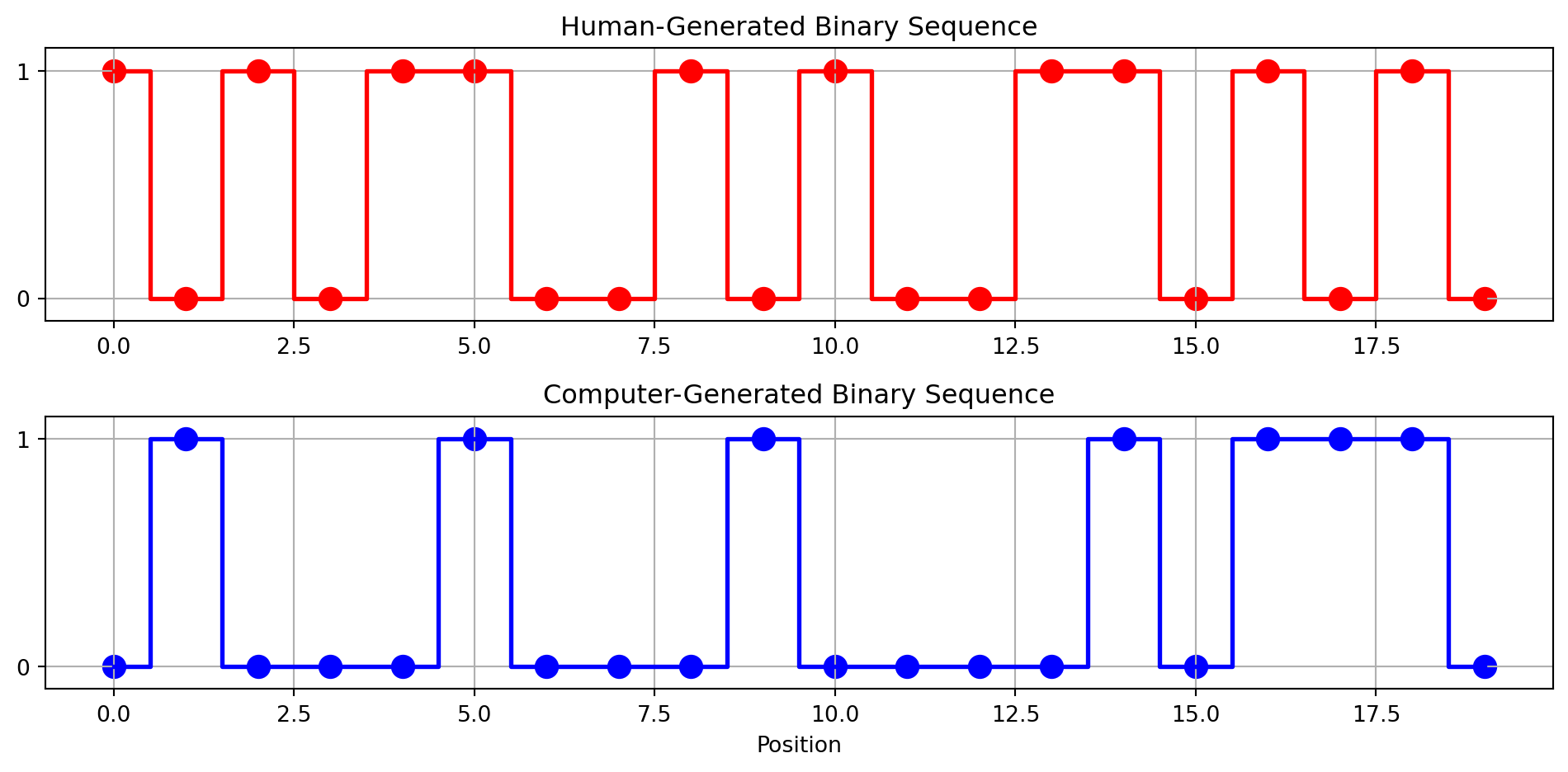
When creating binary sequences manually, patterns often emerge that wouldn’t appear in truly random data:

Code
def visualize_binary_sequences():
    """Visualize and compare binary sequences"""
    # Simulated human-generated sequence (tends to alternate more)
    human_seq = np.array([1, 0, 1, 0, 1, 1, 0, 0, 1, 0, 1, 0, 0, 1, 1, 0, 1, 0, 1, 0])
    
    # Computer-generated random sequence
    np.random.seed(42)
    computer_seq = np.random.randint(0, 2, size=20)
    
    # Visualization
    fig, (ax1, ax2) = plt.subplots(2, 1, figsize=(10, 5))
    
    # Plot human sequence
    ax1.step(range(len(human_seq)), human_seq, 'r-', where='mid', linewidth=2)
    ax1.scatter(range(len(human_seq)), human_seq, color='red', s=100)
    ax1.set_title('Human-Generated Binary Sequence')
    ax1.set_ylim(-0.1, 1.1)
    ax1.set_yticks([0, 1])
    ax1.grid(True)
    
    # Plot computer sequence
    ax2.step(range(len(computer_seq)), computer_seq, 'b-', where='mid', linewidth=2)
    ax2.scatter(range(len(computer_seq)), computer_seq, color='blue', s=100)
    ax2.set_title('Computer-Generated Binary Sequence')
    ax2.set_ylim(-0.1, 1.1)
    ax2.set_yticks([0, 1])
    ax2.set_xlabel('Position')
    ax2.grid(True)
    
    plt.tight_layout()
    plt.show()
    
    # Count transitions
    human_transitions = sum(human_seq[i] != human_seq[i+1] for i in range(len(human_seq)-1))
    computer_transitions = sum(computer_seq[i] != computer_seq[i+1] for i in range(len(computer_seq)-1))
    
    print(f"Human sequence transitions: {human_transitions}/{len(human_seq)-1}")
    print(f"Computer sequence transitions: {computer_transitions}/{len(computer_seq)-1}")

visualize_binary_sequences()

Comparing human-generated vs. computer-generated random binary sequences
Human sequence transitions: 15/19
Computer sequence transitions: 10/19

2.1.3 Validating HDF5 File Content

It’s important to verify that HDF5 files contain the expected data:

Code
def verify_hdf5_content(filename='example.h5'):
    """Demonstrate validation of HDF5 file contents"""
    try:
        with h5py.File(filename, 'r') as f:
            # Check file structure
            print("File structure:")
            def print_structure(name, obj):
                if isinstance(obj, h5py.Dataset):
                    print(f"  - Dataset: {name}, Shape: {obj.shape}, Type: {obj.dtype}")
                elif isinstance(obj, h5py.Group):
                    print(f"  - Group: {name}")
            
            f.visititems(print_structure)
            
            # Check specific dataset
            if 'binary_array' in f:
                data = f['binary_array'][:]
                
                # Validate binary values
                is_binary = np.all(np.isin(data, [0, 1]))
                print(f"Contains only binary values (0, 1): {is_binary}")
                
                # Check dimensions
                print(f"Array dimensions: {data.shape}")
            else:
                print("Binary array not found in file")
                
    except Exception as e:
        print(f"Error reading file: {e}")

verify_hdf5_content()
File structure:
  - Dataset: binary_array, Shape: (3, 5), Type: int64
  - Dataset: float_array, Shape: (5, 10), Type: float64
Contains only binary values (0, 1): True
Array dimensions: (3, 5)

2.1.4 Efficient Data Access

HDF5’s key advantage is efficient access to selected portions of data:

Code
def demonstrate_random_access():
    """Show efficient random access to HDF5 data"""
    # Create a larger dataset
    large_data = np.random.rand(1000, 50)
    
    # Write to file
    with h5py.File('large_example.h5', 'w') as f:
        f.create_dataset('large_array', data=large_data)
    
    # Access specific elements
    with h5py.File('large_example.h5', 'r') as f:
        dataset = f['large_array']
        
        # Get specific indices
        indices = [5, 120, 342, 867]
        selected_rows = dataset[indices]
        
        print(f"Shape of full dataset: {dataset.shape}")
        print(f"Shape of selected rows: {selected_rows.shape}")
        
        # Get specific region
        region = dataset[200:205, 10:15]
        print(f"Shape of region: {region.shape}")

demonstrate_random_access()
Shape of full dataset: (1000, 50)
Shape of selected rows: (4, 50)
Shape of region: (5, 5)