1.1 Neural Network Forward and Backward Propagation
The multilayer perceptron (MLP) performs a sequence of linear transformations and non-linear activations. For an \(L\)-layer network, the forward propagation for each layer \(l\) is given by:
Where: - \(s^{(l)}\) is the pre-activation value at layer \(l\) - \(a^{(l)}\) is the activation value at layer \(l\), with \(a^{(0)} = x\) (the input) - \(W^{(l)}\) and \(b^{(l)}\) are the weights and biases for layer \(l\) - \(h^{(l)}\) is the activation function for layer \(l\)
For backpropagation, we define a cost function \(C\) that measures the difference between the network output \(a^{(L)}\) and the target \(y\). The goal is to compute gradients of \(C\) with respect to all parameters for optimization.
Note
In neural network literature, pre-activation values are often denoted as \(z\), but we follow the convention of using \(s\) for consistency with related course materials.
1.1.1 The Delta Method for Backpropagation
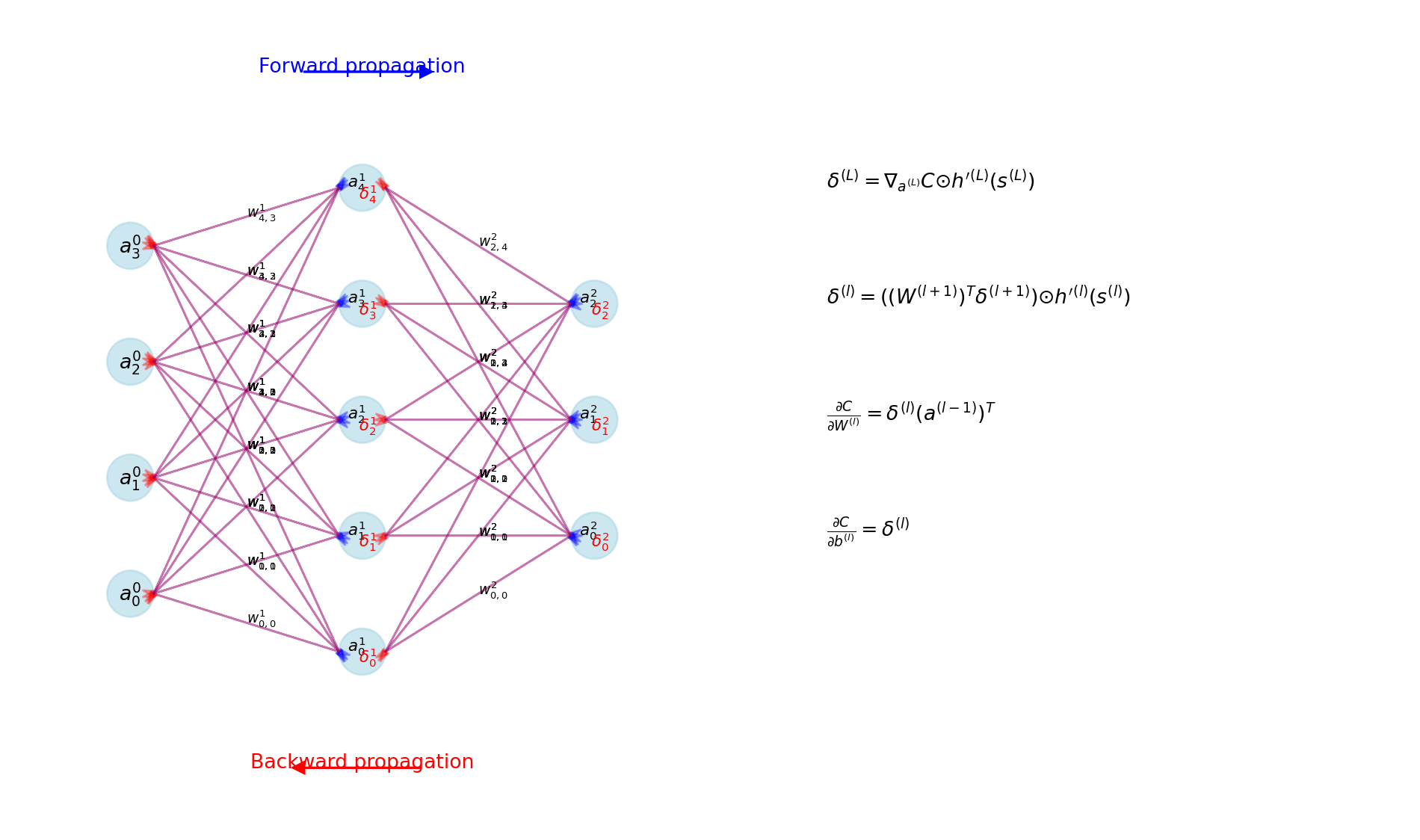
The delta method provides an efficient approach to computing gradients by reusing intermediate calculations. We define the error term \(\delta^{(l)}\) for each layer as:
This represents how the cost function changes with respect to small changes in the pre-activation values. The key insight of backpropagation is that these error terms can be computed recursively:
Where \(\odot\) represents element-wise multiplication and \(h'^{(l)}\) is the derivative of the activation function. From these error terms, we derive parameter gradients:
Figure 1: Illustration of error term propagation in backpropagation
1.2 Activation Functions and Derivatives
Activation functions introduce non-linearity into neural networks, enabling them to learn complex patterns. The choice of activation function affects training dynamics and model performance.
1.2.1 ReLU and Tanh Functions
Two common activation functions are Rectified Linear Unit (ReLU) and hyperbolic tangent (tanh).
1.2.1.1 ReLU Activation
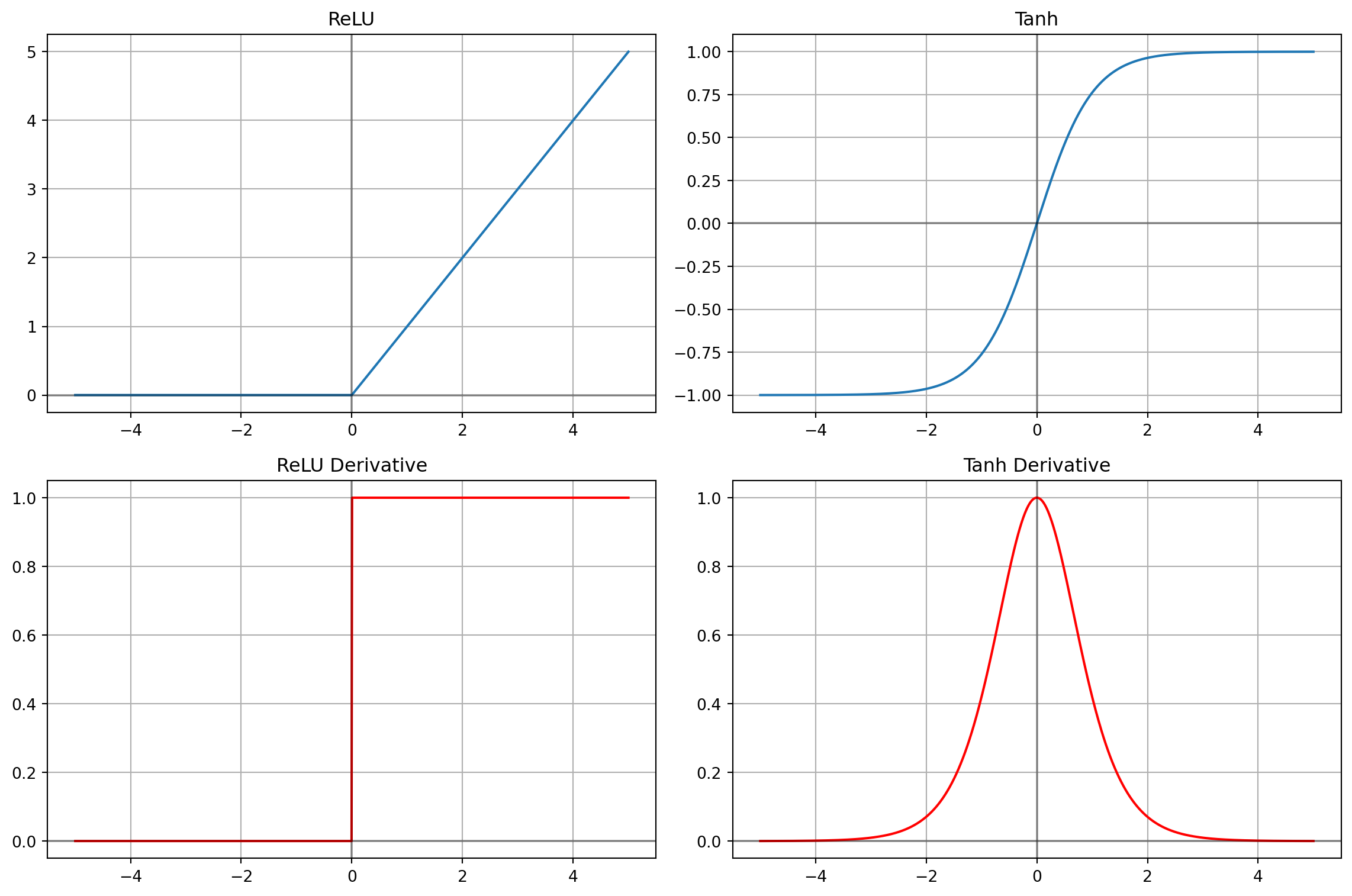
ReLU is defined as: \[\text{ReLU}(x) = \max(0, x)\]
With derivative: \[\text{ReLU}'(x) = \begin{cases}
1 & \text{if } x > 0 \\
0 & \text{if } x < 0 \\
\text{undefined} & \text{if } x = 0
\end{cases}\]
In practice, any value in \([0,1]\) can be used for the derivative at \(x=0\).
1.2.1.2 Tanh Activation
Tanh is defined as: \[\tanh(x) = \frac{e^x - e^{-x}}{e^x + e^{-x}}\]
Figure 2: Activation functions and their derivatives
1.2.2 Impact on Gradient Flow
The choice of activation function significantly impacts how gradients propagate through the network. This directly affects training dynamics and can lead to issues like the vanishing or exploding gradient problem.
The derivative of an activation function determines how much of the gradient signal passes through a neuron during backpropagation:
For tanh, the derivative has a maximum value of 1 at x=0 and approaches 0 as |x| increases. This can cause gradients to diminish as they propagate through many layers.
For ReLU, the derivative is either 0 (for negative inputs) or 1 (for positive inputs). This binary nature can lead to better gradient flow for positive activations but can cause “dying ReLU” problems when too many neurons have negative inputs.
Code
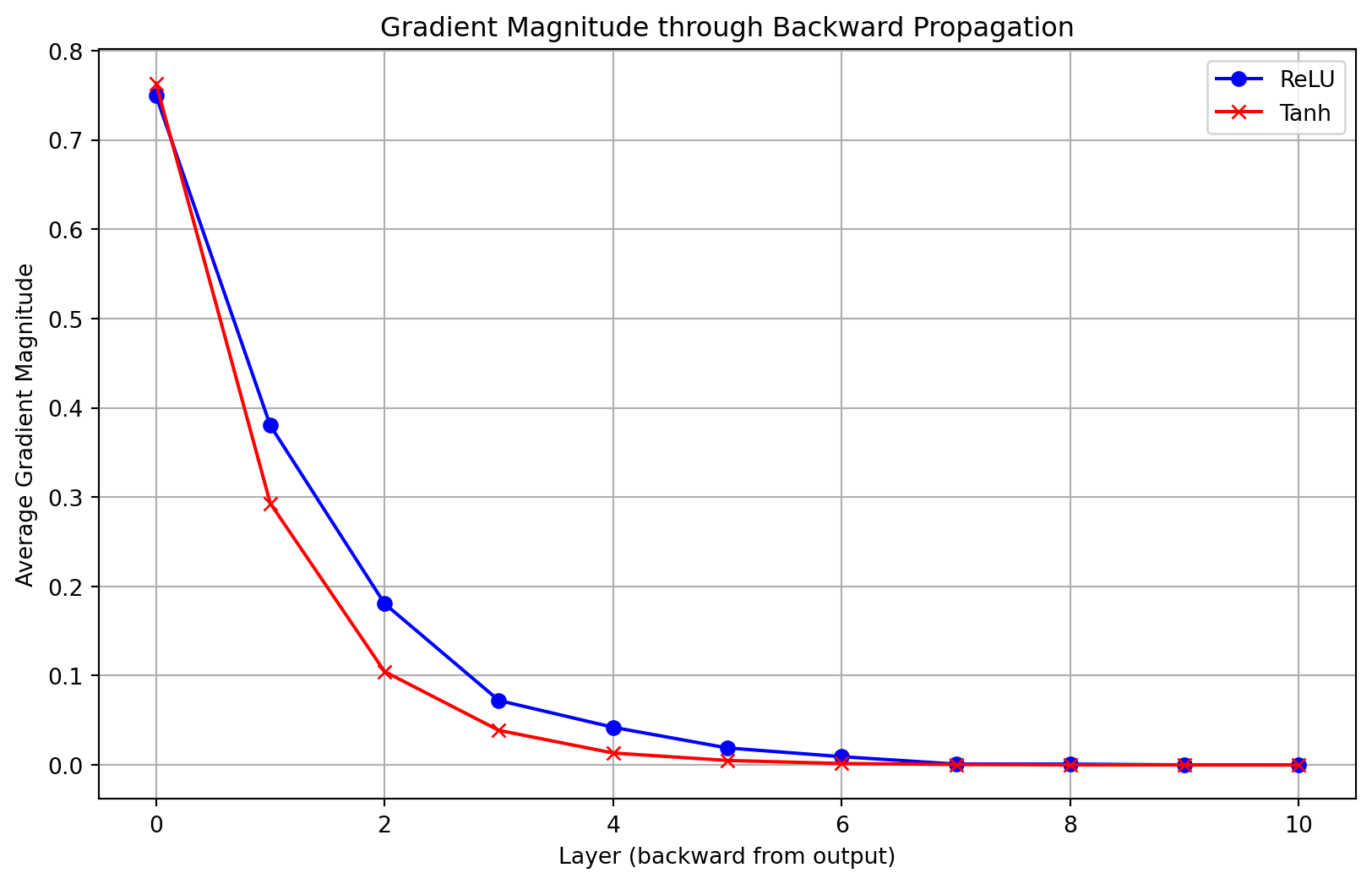
import numpy as npimport matplotlib.pyplot as pltdef demonstrate_gradient_propagation():"""Demonstrate how gradients propagate through layers with different activations""" depth =10# Number of layers n_samples =1000# Generate random initial gradients np.random.seed(42) initial_gradients = np.random.normal(0, 1, (n_samples,))# Track gradients through layers relu_gradients = [initial_gradients] tanh_gradients = [initial_gradients]# Propagate through layersfor _ inrange(depth):# For ReLU: randomly zero out 50% of values (simulating negative inputs) relu_mask = np.random.binomial(1, 0.5, size=n_samples) relu_layer_grad = relu_gradients[-1] * relu_mask relu_gradients.append(relu_layer_grad)# For tanh: multiply by derivative values (simulating tanh derivative distribution)# Tanh derivatives are maximum 1 at x=0, and decrease as |x| increases x_values = np.random.normal(0, 2, size=n_samples) # Simulated pre-activations tanh_derivative =1- np.tanh(x_values)**2# Actual tanh derivative tanh_layer_grad = tanh_gradients[-1] * tanh_derivative tanh_gradients.append(tanh_layer_grad)# Calculate average gradient magnitude per layer relu_magnitudes = [np.mean(np.abs(g)) for g in relu_gradients] tanh_magnitudes = [np.mean(np.abs(g)) for g in tanh_gradients]# Add noise to simulate real training conditions layers = np.arange(depth+1) relu_magnitudes_noisy = np.array(relu_magnitudes) * (1+ np.random.normal(0, 0.05, size=len(relu_magnitudes))) tanh_magnitudes_noisy = np.array(tanh_magnitudes) * (1+ np.random.normal(0, 0.05, size=len(tanh_magnitudes))) plt.figure(figsize=(10, 6)) plt.plot(layers, relu_magnitudes_noisy, 'b-', marker='o', label='ReLU') plt.plot(layers, tanh_magnitudes_noisy, 'r-', marker='x', label='Tanh') plt.xlabel('Layer (backward from output)') plt.ylabel('Average Gradient Magnitude') plt.title('Gradient Magnitude through Backward Propagation') plt.legend() plt.grid(True) plt.show()demonstrate_gradient_propagation()
Figure 3: Gradient magnitude decay through network layers for different activation functions
Important
The vanishing gradient problem is particularly severe in deep networks with saturating activation functions like tanh. As shown in the figure, gradient magnitude can diminish exponentially with network depth, making training early layers very difficult. ReLU mitigates this issue for positive activations but introduces sparsity through “dead” neurons.
1.3 Loss Functions and Optimization
1.3.1 Cross-Entropy for Multi-class Classification
For neural networks performing classification tasks, cross-entropy loss provides an appropriate measure of prediction error. For multi-class classification with one-hot encoded targets, the cross-entropy loss is defined as:
This elegant simplification occurs because the derivative of softmax combines with the derivative of cross-entropy, making the implementation of backpropagation more efficient.
1.3.2 Numerical Stability in Loss Computation
Direct implementation of cross-entropy can lead to numerical instability due to potential division by zero or logarithm of very small numbers. A numerically stable implementation involves adding a small epsilon value:
Code
def stable_cross_entropy(y_true, y_pred):"""Numerically stable implementation of cross-entropy loss"""# Add small epsilon to avoid log(0) epsilon =1e-15 y_pred = np.clip(y_pred, epsilon, 1- epsilon)return-np.sum(y_true * np.log(y_pred), axis=0)
Similarly, when implementing softmax, shifting the inputs by their maximum value improves numerical stability:
Code
def stable_softmax(z):"""Numerically stable implementation of softmax"""# Shift by the maximum value for numerical stability shifted_z = z - np.max(z, axis=0, keepdims=True) exp_z = np.exp(shifted_z)return exp_z / np.sum(exp_z, axis=0, keepdims=True)
Tip
Numerical stability is critical for successful training of neural networks. Unstable implementations can lead to NaN values during training, causing the optimization process to fail. Always use stable implementations of critical functions like softmax and cross-entropy.
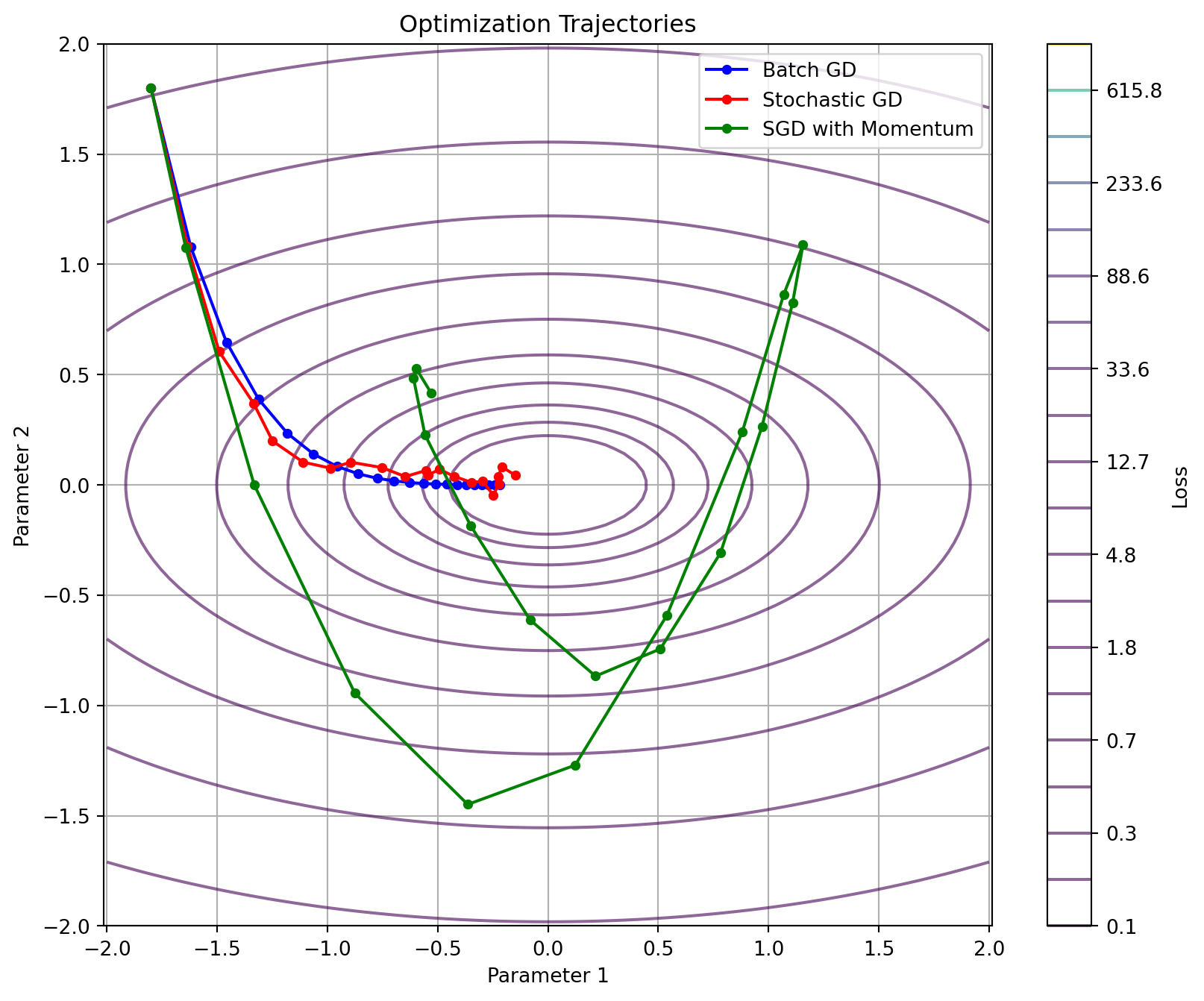
1.3.3 Stochastic Gradient Descent and Variants
Neural networks are typically trained using variants of stochastic gradient descent (SGD). The basic update rule is:
Where \(\theta\) represents the network parameters, \(\eta\) is the learning rate, and \(\nabla_\theta C\) is the gradient of the cost function with respect to the parameters.
Three common approaches to gradient-based optimization are:
Batch Gradient Descent: Computes gradients using the entire dataset.
Stable updates but computationally expensive
Theoretical convergence rate: \(O\left(\frac{1}{t}\right)\) for convex functions
Stochastic Gradient Descent (SGD): Updates parameters using gradients computed from a single training example.
Noisy updates but computationally efficient
Theoretical convergence rate: \(O\left(\frac{1}{\sqrt{t}}\right)\) for convex functions
Mini-batch SGD: Computes gradients using a small batch of examples.
Balances stability and efficiency
Common batch sizes range from 32 to 256
Code
import numpy as npimport matplotlib.pyplot as pltdef plot_sgd_variants():"""Visualize optimization trajectories for different SGD variants"""# Generate a simple loss surface x = np.linspace(-2, 2, 100) y = np.linspace(-2, 2, 100) X, Y = np.meshgrid(x, y) Z =0.5* X**2+2* Y**2# Simple quadratic function# Create optimization paths# Starting point start_x, start_y =-1.8, 1.8# Batch GD - steady path batch_path_x, batch_path_y = [start_x], [start_y] x_curr, y_curr = start_x, start_y lr =0.1for _ inrange(20):# Gradient of our function: [x, 4y] grad_x, grad_y = x_curr, 4* y_curr x_curr -= lr * grad_x y_curr -= lr * grad_y batch_path_x.append(x_curr) batch_path_y.append(y_curr)# SGD - noisy path sgd_path_x, sgd_path_y = [start_x], [start_y] x_curr, y_curr = start_x, start_yfor _ inrange(20):# Add noise to gradients to simulate stochasticity noise_x = np.random.normal(0, 0.3) noise_y = np.random.normal(0, 0.3) grad_x, grad_y = x_curr + noise_x, 4* y_curr + noise_y x_curr -= lr * grad_x y_curr -= lr * grad_y sgd_path_x.append(x_curr) sgd_path_y.append(y_curr)# SGD with momentum - smoother path with inertia momentum_path_x, momentum_path_y = [start_x], [start_y] x_curr, y_curr = start_x, start_y vx, vy =0, 0# Initialize velocity beta =0.9# Momentum parameterfor _ inrange(20):# Add noise to gradients to simulate stochasticity noise_x = np.random.normal(0, 0.3) noise_y = np.random.normal(0, 0.3) grad_x, grad_y = x_curr + noise_x, 4* y_curr + noise_y# Update with momentum vx = beta * vx - lr * grad_x vy = beta * vy - lr * grad_y x_curr += vx y_curr += vy momentum_path_x.append(x_curr) momentum_path_y.append(y_curr)# Plot plt.figure(figsize=(10, 8))# Plot the contour levels = np.logspace(-1, 3, 20) contour = plt.contour(X, Y, Z, levels=levels, alpha=0.6, cmap='viridis') plt.colorbar(contour, label='Loss')# Plot paths plt.plot(batch_path_x, batch_path_y, 'bo-', label='Batch GD', markersize=4) plt.plot(sgd_path_x, sgd_path_y, 'ro-', label='Stochastic GD', markersize=4) plt.plot(momentum_path_x, momentum_path_y, 'go-', label='SGD with Momentum', markersize=4) plt.title('Optimization Trajectories') plt.xlabel('Parameter 1') plt.ylabel('Parameter 2') plt.legend() plt.grid(True) plt.axis('equal') plt.show()np.random.seed(42)plot_sgd_variants()
Figure 4: Optimization trajectories for different SGD variants on a simple quadratic surface
1.3.4 Learning Rate Scheduling
The learning rate significantly impacts training dynamics. A learning rate that is too high can cause oscillation or divergence, while one that is too low leads to slow convergence.
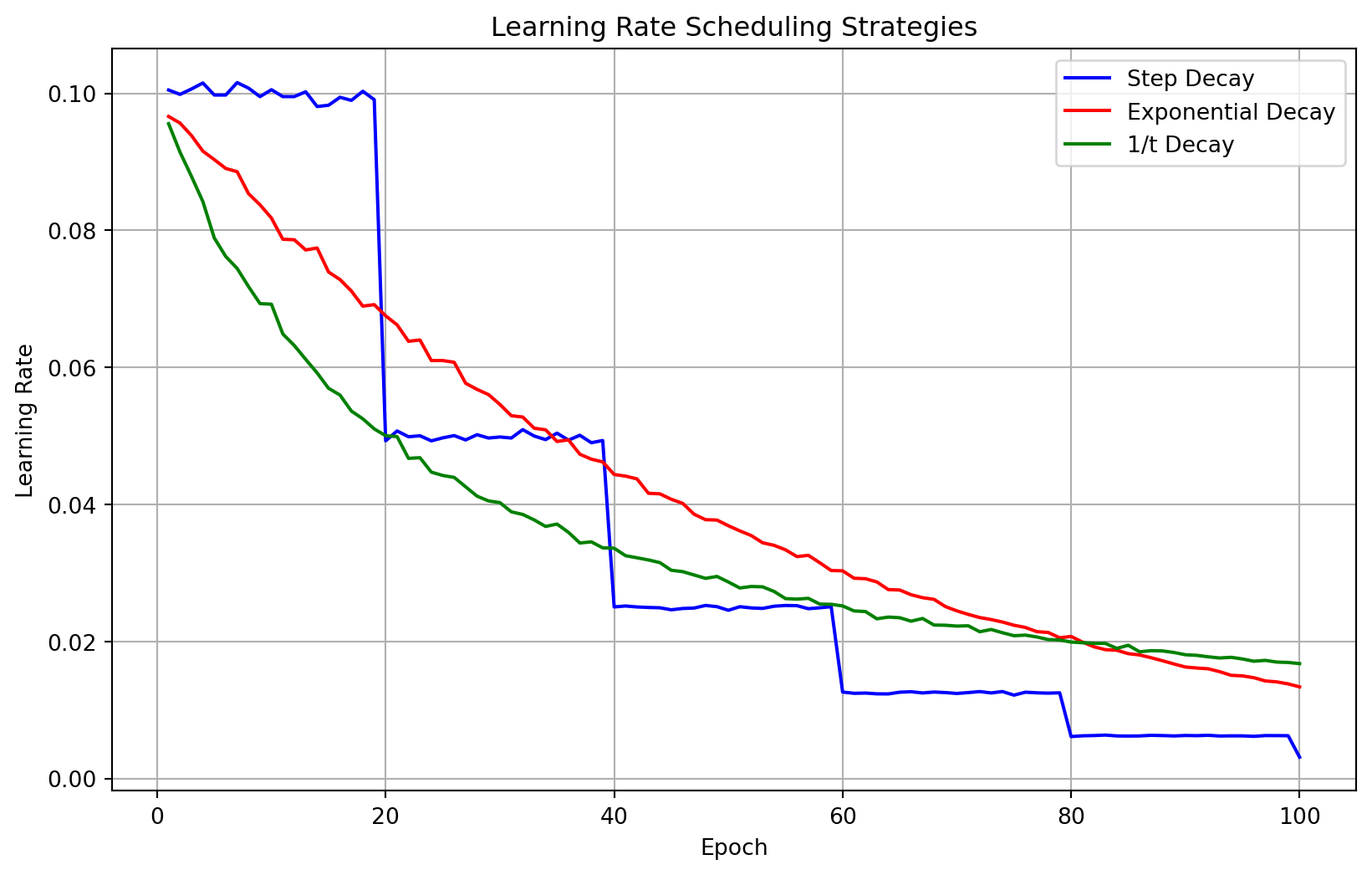
Learning rate scheduling adjusts the learning rate during training, typically decreasing it over time. This allows for large initial steps to quickly approach the optimal region, followed by smaller steps for fine-tuning.
Common scheduling strategies include:
Step Decay: Reduces the learning rate by a factor after a fixed number of epochs. \[\eta_t = \eta_0 \cdot \gamma^{\lfloor t/s \rfloor}\] where \(\gamma\) is the decay factor and \(s\) is the step size.
Exponential Decay: Continuously reduces the learning rate at an exponential rate. \[\eta_t = \eta_0 \cdot e^{-kt}\] where \(k\) is the decay rate.
1/t Decay: Reduces the learning rate proportionally to the inverse of the iteration count. \[\eta_t = \frac{\eta_0}{1 + kt}\] where \(k\) controls the decay speed.
Figure 5: Common learning rate scheduling strategies
The step decay approach is often used in practice for its simplicity and effectiveness. For the MNIST classification task, a common strategy is to start with a modest learning rate (e.g., 0.01-0.1) and reduce it by a factor of 2-10 after a fixed number of epochs.
1.4 Weight Initialization Strategies
1.4.1 Importance of Proper Initialization
Proper weight initialization is critical for neural network training. Poor initialization can lead to:
Vanishing gradients: When weights are too small, activations and their gradients become negligible, slowing or stopping learning.
Exploding gradients: When weights are too large, activations and gradients grow exponentially, causing numerical instability.
Symmetry problems: If all weights are initialized to the same value, neurons in the same layer will compute identical outputs and receive identical gradient updates.
Initialization should break symmetry between neurons while maintaining appropriate scales for activations and gradients.
1.4.2 Common Initialization Methods
1.4.2.1 Random Initialization
The simplest approach is to initialize weights from a uniform or normal distribution:
W = np.random.randn(output_size, input_size) *0.01
This works for shallow networks but often leads to vanishing or exploding gradients in deeper networks.
1.4.2.2 Xavier/Glorot Initialization
Xavier initialization scales weights based on the number of input and output connections:
\[\text{Var}(W) = \frac{2}{n_{in} + n_{out}}\]
For normal distribution:
W = np.random.randn(output_size, input_size) * np.sqrt(2/ (input_size + output_size))
Xavier initialization works well with symmetric activation functions like tanh but is less suitable for ReLU.
1.4.2.3 He Initialization
He initialization is designed specifically for ReLU activation functions:
\[\text{Var}(W) = \frac{2}{n_{in}}\]
For normal distribution:
W = np.random.randn(output_size, input_size) * np.sqrt(2/ input_size)
This accounts for the fact that ReLU sets approximately half of the activations to zero.
Code
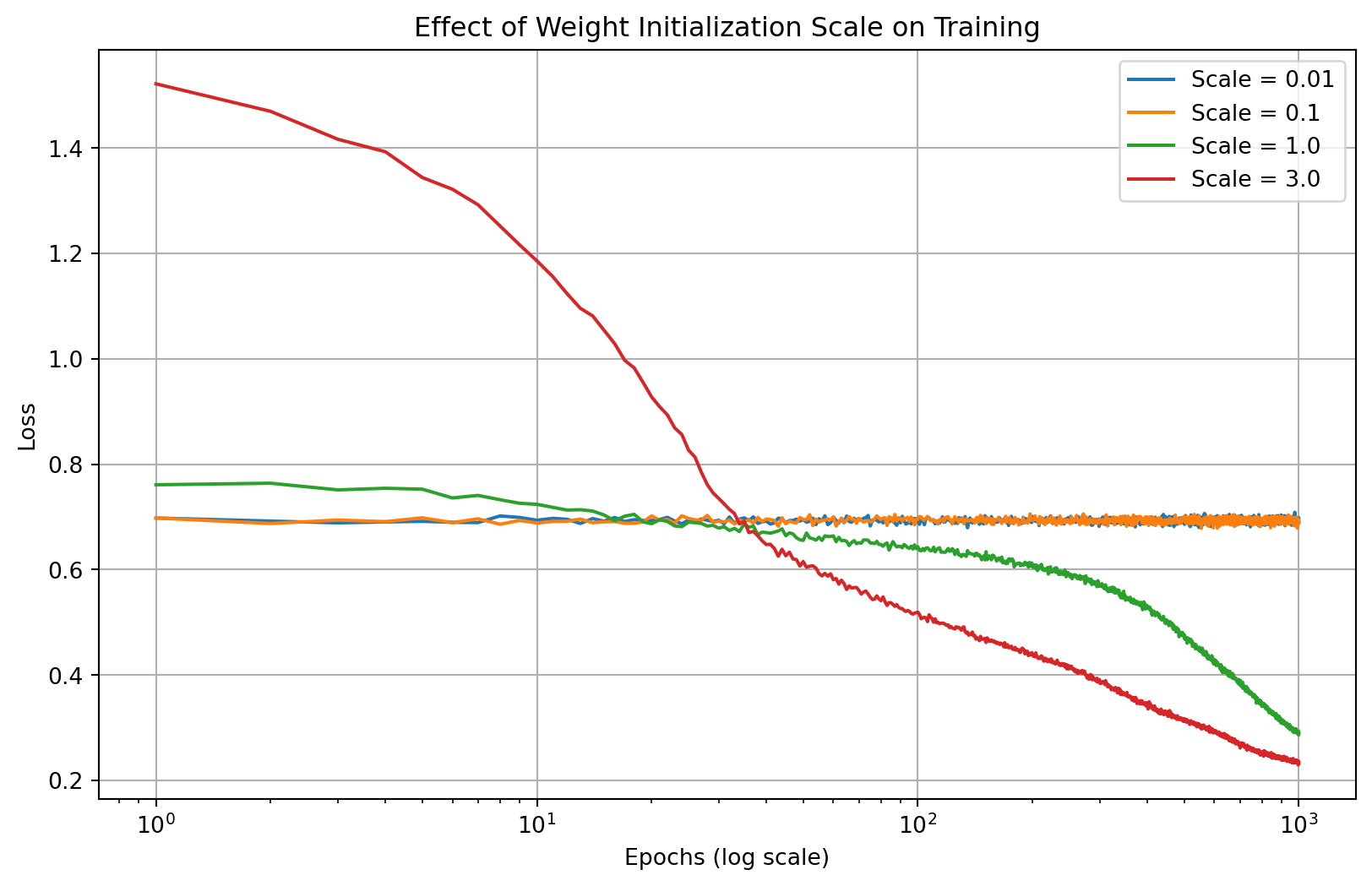
import numpy as npimport matplotlib.pyplot as pltdef demonstrate_initialization_effects():"""Visualize how different initialization strategies affect training"""# Set up a simple problem np.random.seed(42)# Generate synthetic data: XOR-like problem X = np.array([[0, 0], [0, 1], [1, 0], [1, 1]]) y = np.array([[0], [1], [1], [0]])def run_training_simulation(init_scale, n_runs=10, n_epochs=1000): loss_histories = np.zeros((n_runs, n_epochs))for run inrange(n_runs):# Initialize a simple 2-layer network W1 = np.random.randn(2, 2) * init_scale b1 = np.zeros((2, 1)) W2 = np.random.randn(1, 2) * init_scale b2 = np.zeros((1, 1))# Simplified training loopfor epoch inrange(n_epochs):# Forward pass Z1 = np.dot(X, W1.T) + b1.T A1 = np.tanh(Z1) Z2 = np.dot(A1, W2.T) + b2.T A2 =1/ (1+ np.exp(-Z2)) # Sigmoid# Compute loss loss =-np.mean(y * np.log(A2 +1e-10) + (1- y) * np.log(1- A2 +1e-10)) loss_histories[run, epoch] = loss# Backward pass (simplified for simulation) dZ2 = A2 - y dW2 = np.dot(dZ2.T, A1) / X.shape[0] db2 = np.sum(dZ2, axis=0, keepdims=True).T / X.shape[0] dA1 = np.dot(dZ2, W2) dZ1 = dA1 * (1- A1**2) # tanh derivative dW1 = np.dot(dZ1.T, X) / X.shape[0] db1 = np.sum(dZ1, axis=0, keepdims=True).T / X.shape[0]# Update parameters lr =0.1 W1 -= lr * dW1 b1 -= lr * db1 W2 -= lr * dW2 b2 -= lr * db2# Add some noise to make the curves look more realistic noise = np.random.normal(0, 0.02, loss_histories.shape) loss_histories = loss_histories + noise * loss_historiesreturn np.mean(loss_histories, axis=0)# Compare different initialization scales init_scales = [0.01, 0.1, 1.0, 3.0] results = [run_training_simulation(scale) for scale in init_scales]# Plot results plt.figure(figsize=(10, 6)) epochs =range(1, 1001)for i, scale inenumerate(init_scales): plt.plot(epochs, results[i], label=f'Scale = {scale}') plt.xscale('log') plt.xlabel('Epochs (log scale)') plt.ylabel('Loss') plt.title('Effect of Weight Initialization Scale on Training') plt.legend() plt.grid(True) plt.show()demonstrate_initialization_effects()
Figure 6: Effect of initialization scale on training convergence
Note
The mathematical justification for these initialization schemes lies in maintaining the variance of activations and gradients through the network. If the variance changes significantly at each layer, it can lead to signals being magnified or diminished exponentially with network depth, causing training difficulties.
1.4.3 Visualizing Weight Distributions
The distribution of weights during initialization provides insight into the network’s starting condition:
Code
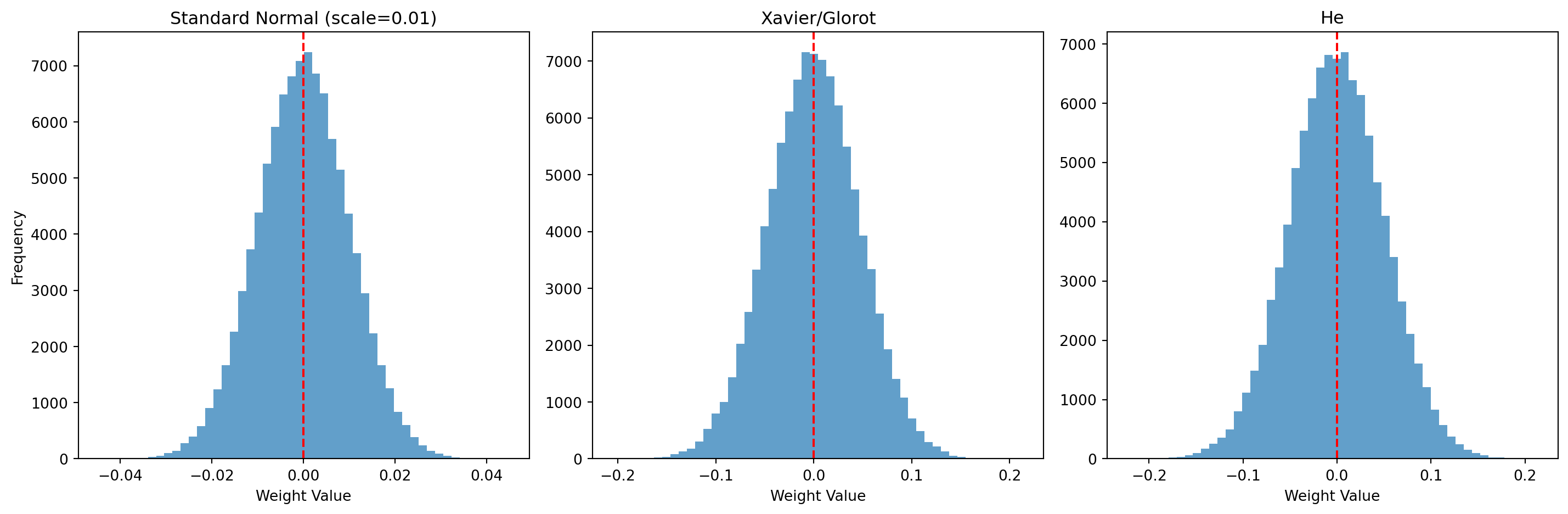
import numpy as npimport matplotlib.pyplot as pltdef visualize_weight_distributions():"""Visualize weight distributions for different initialization methods"""# Initialize weights for a network with layers [784, 128, 64, 10] np.random.seed(42)# Layer sizes for a typical MNIST network layer_sizes = [784, 128, 64, 10]# Standard normal (scale=0.01) std_weights = [np.random.randn(layer_sizes[i+1], layer_sizes[i]) *0.01for i inrange(len(layer_sizes)-1)]# Xavier/Glorot xavier_weights = [np.random.randn(layer_sizes[i+1], layer_sizes[i]) * np.sqrt(2/(layer_sizes[i]+layer_sizes[i+1])) for i inrange(len(layer_sizes)-1)]# He he_weights = [np.random.randn(layer_sizes[i+1], layer_sizes[i]) * np.sqrt(2/layer_sizes[i]) for i inrange(len(layer_sizes)-1)]# Plot distributions for the first hidden layer layer_idx =0# First layer (784 -> 128) plt.figure(figsize=(15, 5))# Standard normal plt.subplot(1, 3, 1) plt.hist(std_weights[layer_idx].flatten(), bins=50, alpha=0.7) plt.title(f'Standard Normal (scale=0.01)') plt.xlabel('Weight Value') plt.ylabel('Frequency') plt.axvline(x=0, color='r', linestyle='--')# Xavier/Glorot plt.subplot(1, 3, 2) plt.hist(xavier_weights[layer_idx].flatten(), bins=50, alpha=0.7) plt.title(f'Xavier/Glorot') plt.xlabel('Weight Value') plt.axvline(x=0, color='r', linestyle='--')# He plt.subplot(1, 3, 3) plt.hist(he_weights[layer_idx].flatten(), bins=50, alpha=0.7) plt.title(f'He') plt.xlabel('Weight Value') plt.axvline(x=0, color='r', linestyle='--') plt.tight_layout() plt.show()# Print variance statisticsprint("Weight variance statistics for Layer 1 (784 -> 128):")print(f"Standard Normal (0.01): {np.var(std_weights[layer_idx]):.8f}")print(f"Xavier/Glorot: {np.var(xavier_weights[layer_idx]):.8f}")print(f"He: {np.var(he_weights[layer_idx]):.8f}")print(f"Theoretical Xavier/Glorot: {2/(layer_sizes[0]+layer_sizes[1]):.8f}")print(f"Theoretical He: {2/layer_sizes[0]:.8f}")visualize_weight_distributions()
Figure 7: Weight distributions for different initialization methods
Weight variance statistics for Layer 1 (784 -> 128):
Standard Normal (0.01): 0.00010017
Xavier/Glorot: 0.00219184
He: 0.00255052
Theoretical Xavier/Glorot: 0.00219298
Theoretical He: 0.00255102
For MNIST classification, either Xavier (for tanh) or He (for ReLU) initialization is appropriate, depending on the chosen activation function.
1.5 Regularization Techniques
1.5.1 Overfitting in Neural Networks
Neural networks, particularly those with many parameters, are prone to overfitting—the phenomenon where a model learns the training data too well, including its noise and peculiarities, at the expense of generalization to new data.
Signs of overfitting include: - Training loss continues to decrease while validation loss begins to increase - Large gap between training and validation performance - Network makes confident but incorrect predictions on test data
Regularization techniques aim to prevent overfitting by constraining the model’s complexity or adding noise during training.
1.5.2 Weight Penalties (L1 and L2 Regularization)
Weight penalty regularization adds a term to the cost function that penalizes large weights:
\[C_{reg} = C + \lambda R(W)\]
Where \(C\) is the original cost function, \(\lambda\) is the regularization strength, and \(R(W)\) is the regularization term.
1.5.2.1 L2 Regularization (Weight Decay)
L2 regularization adds the sum of squared weights to the cost:
#| label: fig-regularization#| fig-cap: "Effect of regularization on model fit and weight distributions"# TODO: fix, exploding gradient issueimport numpy as npimport matplotlib.pyplot as pltdef demonstrate_regularization_effects():"""Visualize how regularization affects model fit and weight distribution""" np.random.seed(42)# Generate synthetic data n_samples =150 X = np.linspace(-3, 3, n_samples).reshape(-1, 1) true_function =lambda x: np.sin(x) +0.3* x y = true_function(X) + np.random.normal(0, 0.2, size=X.shape)# Split into train and test train_idx = np.random.choice(n_samples, int(0.8* n_samples), replace=False) test_idx = np.array(list(set(range(n_samples)) -set(train_idx))) X_train, y_train = X[train_idx], y[train_idx] X_test, y_test = X[test_idx], y[test_idx]# Function to create polynomial featuresdef create_poly_features(X, degree):return np.column_stack([X**i for i inrange(1, degree+1)])# Polynomial degree degree =15# Create polynomial features X_train_poly = create_poly_features(X_train, degree) X_test_poly = create_poly_features(X_test, degree)# Train three models: no regularization, L2, and L1# Function to train a model with different regularizationdef train_model(X, y, l2_lambda=0, l1_lambda=0, iterations=5000):# Initialize weights randomly w = np.random.randn(X.shape[1], y.shape[1]) *0.01# Add some noise to training process to simulate real conditions lr =0.01 losses = [] weight_history = []for i inrange(iterations):# Predictions y_pred = X @ w# Base loss (MSE) mse_loss = np.mean((y_pred - y)**2)# Add regularization terms to loss l2_term =0 l1_term =0if l2_lambda >0: l2_term = l2_lambda * np.sum(w**2)if l1_lambda >0: l1_term = l1_lambda * np.sum(np.abs(w)) total_loss = mse_loss + l2_term + l1_term losses.append(total_loss)# Store weights periodicallyif i %500==0: weight_history.append(w.copy())# Compute gradients# MSE gradient mse_grad =2* X.T @ (y_pred - y) /len(y)# L2 gradient l2_grad =0if l2_lambda >0: l2_grad =2* l2_lambda * w# L1 gradient l1_grad =0if l1_lambda >0: l1_grad = l1_lambda * np.sign(w)# Combined gradient gradient = mse_grad + l2_grad + l1_grad# Update weights w = w - lr * gradient# Add some noise to weights to simulate stochastic trainingif i %100: w = w + np.random.normal(0, 0.001, size=w.shape)return w, losses, weight_history# Train models with different regularization w_no_reg, losses_no_reg, wh_no_reg = train_model(X_train_poly, y_train) w_l2, losses_l2, wh_l2 = train_model(X_train_poly, y_train, l2_lambda=0.1) w_l1, losses_l1, wh_l1 = train_model(X_train_poly, y_train, l1_lambda=0.1)# Make predictions y_pred_no_reg = X_test_poly @ w_no_reg y_pred_l2 = X_test_poly @ w_l2 y_pred_l1 = X_test_poly @ w_l1# Calculate test errors mse_no_reg = np.mean((y_test - y_pred_no_reg)**2) mse_l2 = np.mean((y_test - y_pred_l2)**2) mse_l1 = np.mean((y_test - y_pred_l1)**2)# Plot results plt.figure(figsize=(15, 10))# Plot model fits plt.subplot(2, 2, 1) plt.scatter(X_train, y_train, color='blue', alpha=0.6, label='Training Data') plt.scatter(X_test, y_test, color='green', alpha=0.6, label='Test Data') X_plot = np.linspace(-3, 3, 100).reshape(-1, 1) X_plot_poly = create_poly_features(X_plot, degree) plt.plot(X_plot, X_plot_poly @ w_no_reg, 'r-', label=f'No Reg (Test MSE: {mse_no_reg:.4f})') plt.plot(X_plot, X_plot_poly @ w_l2, 'g-', label=f'L2 Reg (Test MSE: {mse_l2:.4f})') plt.plot(X_plot, X_plot_poly @ w_l1, 'b-', label=f'L1 Reg (Test MSE: {mse_l1:.4f})') plt.plot(X_plot, true_function(X_plot), 'k--', label='True Function') plt.title('Model Fit with Different Regularization') plt.xlabel('X') plt.ylabel('y') plt.legend() plt.grid(True)# Plot training curves plt.subplot(2, 2, 2) plt.plot(losses_no_reg, 'r-', label='No Regularization') plt.plot(losses_l2, 'g-', label='L2 Regularization') plt.plot(losses_l1, 'b-', label='L1 Regularization') plt.title('Training Loss') plt.xlabel('Iteration') plt.ylabel('Loss') plt.legend() plt.grid(True)# Plot final weight distributions plt.subplot(2, 2, 3) plt.stem(range(1, degree+1), w_no_reg, 'r', label='No Regularization', markerfmt='ro') plt.stem(range(1, degree+1), w_l2, 'g', label='L2 Regularization', markerfmt='go') plt.stem(range(1, degree+1), w_l1, 'b', label='L1 Regularization', markerfmt='bo') plt.title('Final Weight Values') plt.xlabel('Polynomial Degree') plt.ylabel('Weight Value') plt.legend() plt.grid(True)# Plot weight magnitude evolution (L2 norm) plt.subplot(2, 2, 4) w_norms_no_reg = [np.linalg.norm(w) for w in wh_no_reg] w_norms_l2 = [np.linalg.norm(w) for w in wh_l2] w_norms_l1 = [np.linalg.norm(w) for w in wh_l1] iterations = np.arange(0, 5000, 500) plt.plot(iterations, w_norms_no_reg, 'r-o', label='No Regularization') plt.plot(iterations, w_norms_l2, 'g-o', label='L2 Regularization') plt.plot(iterations, w_norms_l1, 'b-o', label='L1 Regularization') plt.title('Weight Magnitude Evolution') plt.xlabel('Iteration') plt.ylabel('Weight L2 Norm') plt.legend() plt.grid(True) plt.tight_layout() plt.show()demonstrate_regularization_effects()
Tip
For MNIST classification, L2 regularization is often sufficient and widely used. A typical value for the regularization parameter \(\lambda\) is in the range of 0.0001 to 0.01, depending on the network size and dataset characteristics.
1.5.3 Implementing Regularization
Adding regularization to the backpropagation algorithm requires modifying both the cost function and the weight update rule:
def compute_cost_with_regularization(y_true, y_pred, weights, lambda_val, reg_type='L2'):"""Compute cost with regularization"""# Base cost (e.g., cross-entropy) base_cost = compute_cost(y_true, y_pred)# Regularization term reg_cost =0if reg_type =='L2':for w in weights: reg_cost += np.sum(np.square(w)) reg_cost *= (lambda_val / (2*len(y_true)))elif reg_type =='L1':for w in weights: reg_cost += np.sum(np.abs(w)) reg_cost *= (lambda_val /len(y_true))return base_cost + reg_costdef update_parameters_with_regularization(param, grad, learning_rate, lambda_val, m, reg_type='L2'):"""Update parameters with regularization"""if reg_type =='L2':# L2 regularization (weight decay) param -= learning_rate * (grad + (lambda_val / m) * param)elif reg_type =='L1':# L1 regularization param -= learning_rate * (grad + (lambda_val / m) * np.sign(param))else:# No regularization param -= learning_rate * gradreturn param
1.6 Learning Curves and Diagnostics
1.6.1 Monitoring Training Progress
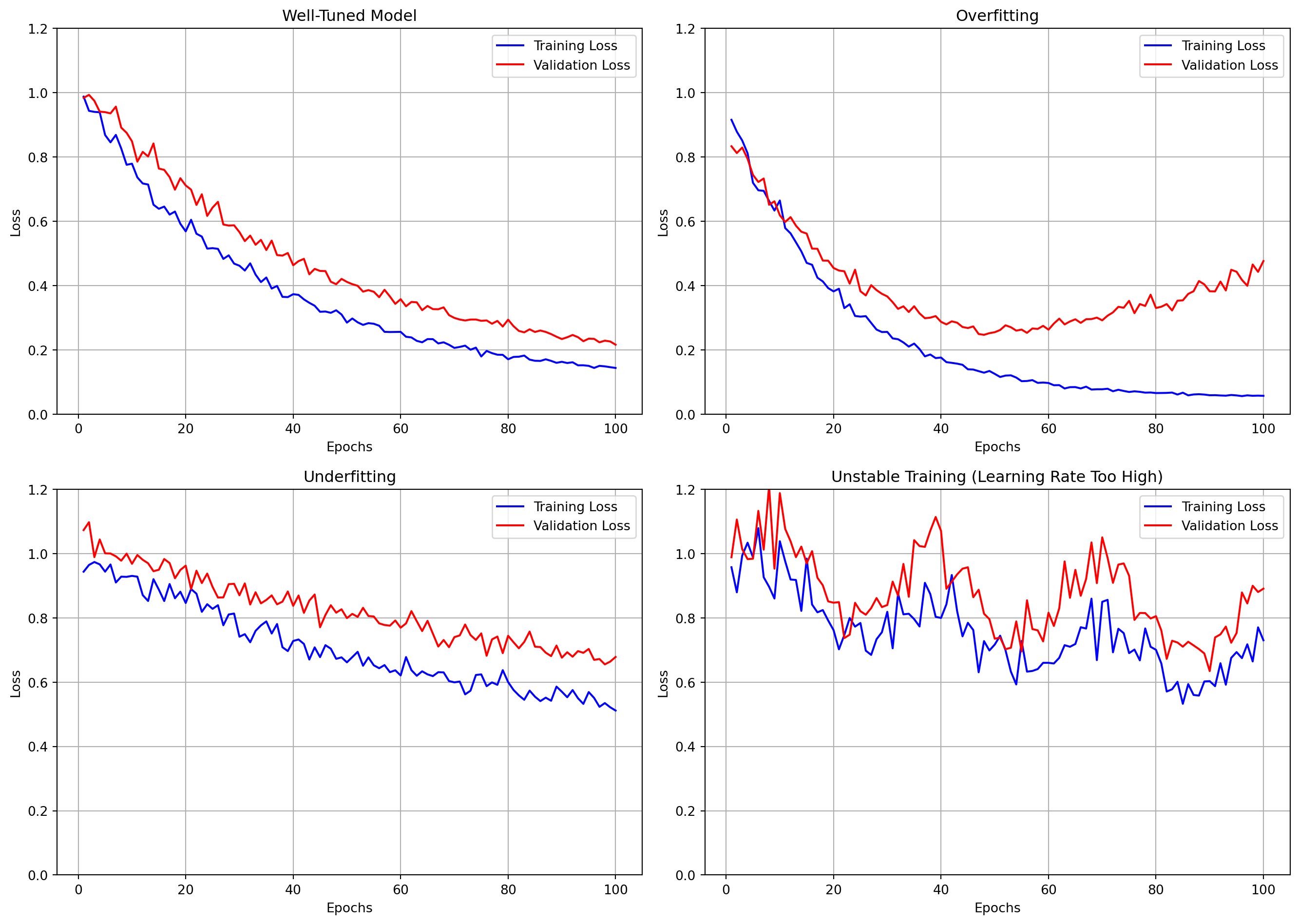
Learning curves are essential diagnostic tools for neural network training. They track metrics like loss and accuracy over epochs, providing insights into the training dynamics.
Key patterns to look for in learning curves:
Convergence: Loss should decrease and accuracy should increase over time.
Overfitting: Training metrics improve while validation metrics stagnate or worsen.
Underfitting: Both training and validation metrics plateau at suboptimal values.
Instability: Erratic changes in metrics may indicate too high a learning rate or other issues.
Symptoms: - Many ReLU units output zero for all inputs - Network capacity is reduced
Solutions: - Lower learning rate - Use Leaky ReLU or other activation variants - He initialization
1.6.3 Visualizing Model Behavior
Visualizing weights and activations can provide insights into what the network is learning:
Code
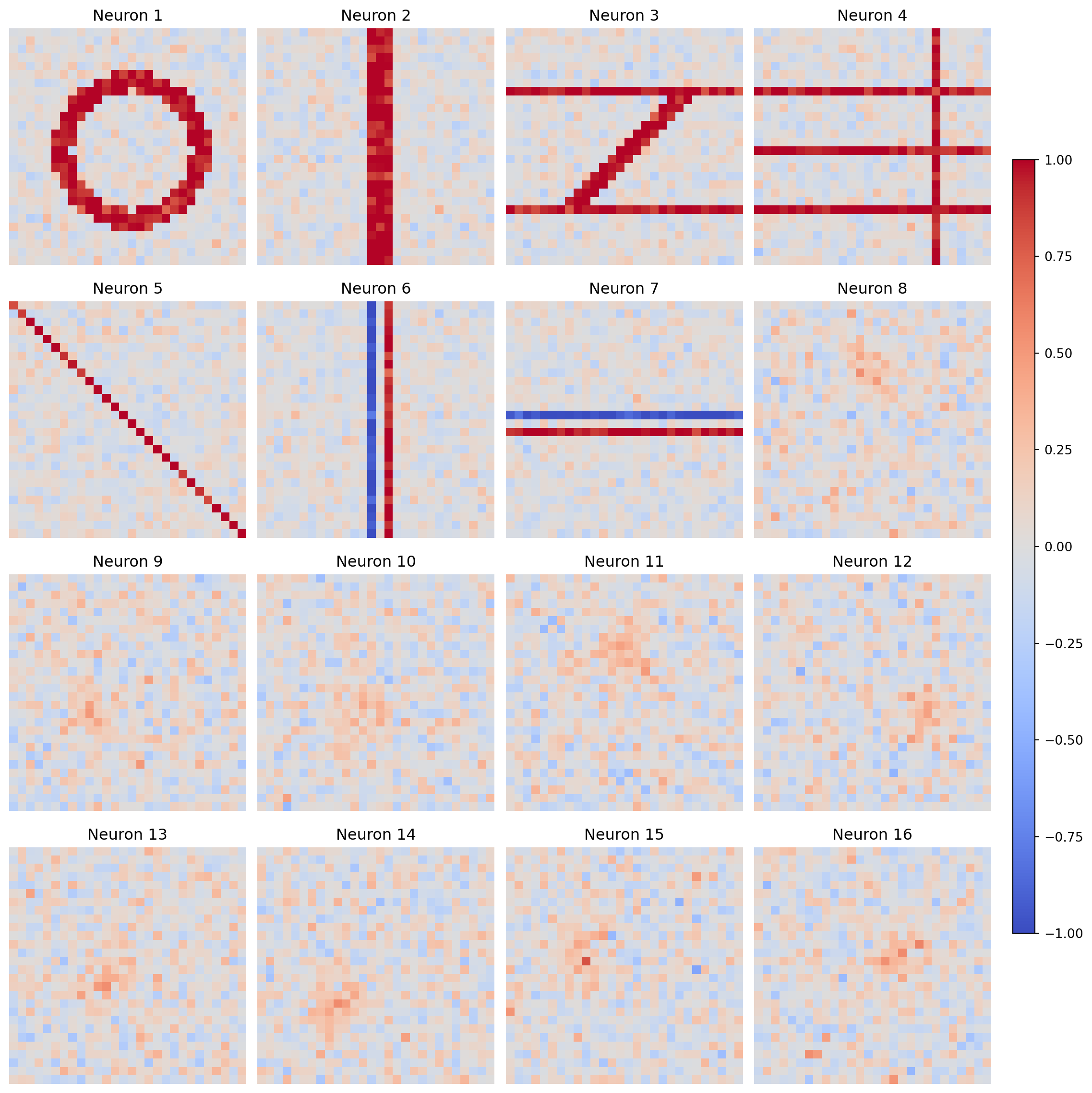
import numpy as npimport matplotlib.pyplot as pltdef visualize_mnist_weights():"""Simulate and visualize weights from a network trained on MNIST"""# Simulate weights that might develop when training on MNIST np.random.seed(42)# Create a grid of artificial weight patterns (simulating features learned from MNIST) n_neurons =16 img_size =28# Initialize random weights weights = np.random.randn(n_neurons, img_size, img_size) *0.01# Modify weights to simulate learned patterns digit_patterns = []# Simulate digit 0 (circle) pattern0 = np.zeros((img_size, img_size))for i inrange(img_size):for j inrange(img_size):if ((i-img_size/2)**2+ (j-img_size/2)**2< (img_size/3)**2) and\ ((i-img_size/2)**2+ (j-img_size/2)**2> (img_size/4)**2): pattern0[i, j] =1 digit_patterns.append(pattern0)# Simulate digit 1 (vertical line) pattern1 = np.zeros((img_size, img_size)) pattern1[:, img_size//2-1:img_size//2+2] =1 digit_patterns.append(pattern1)# Simulate digit 2 (top and bottom horizontal lines with diagonal) pattern2 = np.zeros((img_size, img_size)) pattern2[img_size//4, :] =1 pattern2[3*img_size//4, :] =1for i inrange(img_size//4, 3*img_size//4): j =3*img_size//4- (i - img_size//4) pattern2[i, j-1:j+2] =1 digit_patterns.append(pattern2)# Simulate digit 3 (horizontal lines with gaps) pattern3 = np.zeros((img_size, img_size)) pattern3[img_size//4, :] =1 pattern3[img_size//2, :] =1 pattern3[3*img_size//4, :] =1 pattern3[:, 3*img_size//4] =1 digit_patterns.append(pattern3)# Simulate stroke detector (diagonal line) stroke1 = np.zeros((img_size, img_size))for i inrange(img_size): j = iif0<= j < img_size: stroke1[i, j] =1 digit_patterns.append(stroke1)# Simulate vertical edge detector edge1 = np.zeros((img_size, img_size)) edge1[:, img_size//2-1] =-1 edge1[:, img_size//2+1] =1 digit_patterns.append(edge1)# Simulate horizontal edge detector edge2 = np.zeros((img_size, img_size)) edge2[img_size//2-1, :] =-1 edge2[img_size//2+1, :] =1 digit_patterns.append(edge2)# Create the rest as noise with some structurefor i inrange(n_neurons -len(digit_patterns)): pattern = np.random.randn(img_size, img_size) *0.1# Add some structure (random blob) center_i = np.random.randint(img_size//4, 3*img_size//4) center_j = np.random.randint(img_size//4, 3*img_size//4)for i_idx inrange(img_size):for j_idx inrange(img_size): dist = np.sqrt((i_idx-center_i)**2+ (j_idx-center_j)**2)if dist < img_size//5: pattern[i_idx, j_idx] +=0.5* np.exp(-dist/(img_size//10)) digit_patterns.append(pattern)# Assign patterns to weightsfor i inrange(n_neurons): weights[i] = digit_patterns[i] + np.random.randn(img_size, img_size) *0.1# Flatten weights for visualization weights_flat = weights.reshape(n_neurons, img_size*img_size)# Plot weights fig, axes = plt.subplots(4, 4, figsize=(12, 12))for i, ax inenumerate(axes.flat):if i < n_neurons: im = ax.imshow(weights[i], cmap='coolwarm', vmin=-1, vmax=1) ax.set_title(f'Neuron {i+1}') ax.axis('off') plt.tight_layout() plt.subplots_adjust(right=0.9) cbar_ax = fig.add_axes([0.92, 0.15, 0.02, 0.7]) fig.colorbar(im, cax=cbar_ax) plt.show()visualize_mnist_weights()
Figure 9: Visualization of first-layer weights in a network trained on MNIST
After training on MNIST, first-layer weights often resemble edge detectors, stroke patterns, or digit fragments. These visualizations provide insights into what features the network has learned to recognize.
1.7 Object-Oriented Neural Network Design
An object-oriented design provides a flexible framework for neural network implementation, though it is optional for this assignment. Any well-structured solution that encapsulates network components and manages their interactions appropriately suffices. The patterns presented here mirror design principles found in frameworks like PyTorch, and are valuable context for understanding these frameworks.
1.7.1 Design Patterns for Neural Network Implementation
Neural network designs benefit from clear separation of concerns through abstraction. Core components like layers and activation functions can be implemented as distinct classes with well-defined interfaces:
class Layer:"""Abstract base class establishing neural network layer interface"""def forward(self, inputs):"""Transform inputs through the layer"""raiseNotImplementedError()def backward(self, grad_output):"""Propagate gradients backward and compute parameter gradients"""raiseNotImplementedError()def parameters(self):"""Return trainable parameters"""return []
This abstraction establishes a uniform interface that decouples layer implementations from the broader network architecture. Each concrete layer need only satisfy this contract without knowledge of the overall network structure.
1.7.2 Computational Graph Representation
Neural networks form computational graphs where data flows forward through transformations during inference and gradients flow backward during training. Object-oriented designs can explicitly model this structure:
class ComputationalNode:"""Base class for nodes in computational graph"""def forward(self, *inputs):"""Compute output from inputs"""self.inputs = inputs # Cache for backward passreturnself._compute_output(*inputs)def backward(self, grad_output):"""Compute gradients with respect to inputs"""returnself._compute_input_gradients(grad_output)def _compute_output(self, *inputs):raiseNotImplementedError()def _compute_input_gradients(self, grad_output):raiseNotImplementedError()
Linear transformations represent fundamental operations in neural networks, implementing the matrix multiplication operation \(\mathbf{z} = \mathbf{W}\mathbf{a} + \mathbf{b}\):
class LinearTransformation(Layer):"""Implements affine transformation z = Wa + b"""def__init__(self, input_dim, output_dim, initialization_scale=0.01):# Initialize parametersself.W = np.random.randn(output_dim, input_dim) * initialization_scaleself.b = np.zeros((output_dim, 1))self.gradients = {'W': None, 'b': None}def forward(self, inputs):# Cache inputs for backward passself.cache = inputs# Compute z = Wa + breturn np.dot(self.W, inputs) +self.b
The activation function introduces non-linearity, enabling the network to model complex relationships. Different activation functions exhibit distinct behavior during gradient propagation:
class Activation(Layer):"""Applies non-linear activation function element-wise"""def forward(self, inputs):self.cache = inputsreturnself._activation_function(inputs)def backward(self, grad_output):# Element-wise product with activation derivative inputs =self.cachereturn grad_output *self._activation_derivative(inputs)
1.7.3 Parameter Management and Optimization
The backpropagation algorithm computes parameter gradients, which must be systematically organized and applied during optimization. A structured approach to parameter management facilitates implementation:
class Parameter:"""Encapsulates trainable parameters and associated gradients"""def__init__(self, data):self.data = dataself.grad = np.zeros_like(data)def update(self, learning_rate):"""Apply gradient descent update"""self.data -= learning_rate *self.grad
Modern optimizers extend beyond vanilla gradient descent and incorporate momentum, adaptive learning rates, and regularization. These algorithms benefit from encapsulation:
class Optimizer:"""Base class for optimization algorithms"""def__init__(self, parameters, learning_rate):self.parameters = parametersself.learning_rate = learning_ratedef step(self):"""Update parameters using computed gradients"""raiseNotImplementedError()
1.7.4 Network Composition and Training
The neural network integrates these components into a cohesive system that manages forward and backward signal propagation:
class NeuralNetwork:"""Integrates layers into complete neural network"""def__init__(self):self.layers = []def add_layer(self, layer):"""Append layer to network"""self.layers.append(layer)def forward(self, inputs):"""Propagate inputs through the network""" activation = inputsfor layer inself.layers: activation = layer.forward(activation)return activationdef backward(self, gradient):"""Backpropagate gradient through the network"""for layer inreversed(self.layers): gradient = layer.backward(gradient)
The complete training loop orchestrates mini-batch preparation, forward and backward passes, and parameter updates:
def train_epoch(network, X, y, batch_size, optimizer):"""Train network for one epoch""" indices = np.random.permutation(X.shape[1])for start_idx inrange(0, X.shape[1], batch_size):# Extract mini-batch batch_indices = indices[start_idx:start_idx + batch_size] X_batch = X[:, batch_indices] y_batch = y[:, batch_indices]# Forward pass y_pred = network.forward(X_batch)# Compute loss gradient gradient = compute_loss_gradient(y_pred, y_batch)# Backward pass network.backward(gradient)# Update parameters optimizer.step()
This approach facilitates separation of concerns, enabling independent experimentation with network structure, activation functions, and optimization techniques. The interfaces provide sufficient abstraction to support a wide range of implementation strategies while maintaining a coherent overall design.
1.8 MNIST Implementation Considerations
1.8.1 Data Preparation
For MNIST, proper data preparation includes:
Normalization: Scale pixel values to [0, 1] by dividing by 255
Reshaping: Convert 28×28 images to vectors of size 784
One-hot encoding: Convert class labels to one-hot vectors
def prepare_mnist_data(X, y):"""Prepare MNIST data for neural network training"""# Normalize pixel values to [0, 1] X = X /255.0# Reshape images to vectorsiflen(X.shape) >2: X = X.reshape(X.shape[0], -1).T # Shape: (784, num_samples)# Convert labels to one-hot encoding y_one_hot = np.zeros((10, y.shape[0]))for i inrange(y.shape[0]): y_one_hot[y[i], i] =1return X, y_one_hot
1.8.2 Network Architecture
For MNIST classification, a simple architecture might include:
Input layer: 784 neurons (28×28 flattened image)
Hidden layer(s): 128-512 neurons with ReLU or tanh activation
Output layer: 10 neurons with softmax activation
def create_mnist_network(hidden_sizes=[128], activation='relu'):"""Create a neural network for MNIST classification""" model = NeuralNetwork()# Input layer to first hidden layer model.add(LinearLayer(784, hidden_sizes[0]))# Add activation functionif activation =='relu': model.add(ReLU())else: # tanh model.add(Tanh())# Add additional hidden layers if specifiedfor i inrange(1, len(hidden_sizes)): model.add(LinearLayer(hidden_sizes[i-1], hidden_sizes[i]))if activation =='relu': model.add(ReLU())else: # tanh model.add(Tanh())# Output layer model.add(LinearLayer(hidden_sizes[-1], 10))# Note: Softmax is typically integrated with cross-entropy loss for numerical stability# Set loss function model.set_loss(CrossEntropyLoss())return model
1.8.3 Hyperparameter Suggestions
Key hyperparameters for MNIST classification:
Hyperparameter
Typical Range
Considerations
Learning Rate
0.01-0.1
Start with 0.01 and adjust based on training dynamics
Batch Size
50-1000
Smaller batches introduce more noise, larger batches are more stable
Hidden Layer Size
64-512
Start with 128 and adjust based on performance
Activation
ReLU or tanh
ReLU often converges faster, tanh can be more stable
Weight Initialization
He or Xavier
Match initialization to activation (He for ReLU, Xavier for tanh)
Regularization
L2 (0.0001-0.01)
Start with 0.0001 and adjust if overfitting occurs
For the required learning rate decay, reducing the learning rate by a factor of 2 after epochs 20 and 40 (as specified) typically works well, but you may need to adjust based on your specific architecture.